
Use this cross multiply calculator to solve one missing value in a proportion or check whether two ratios are equal.
How to use our Cross Multiply Calculator
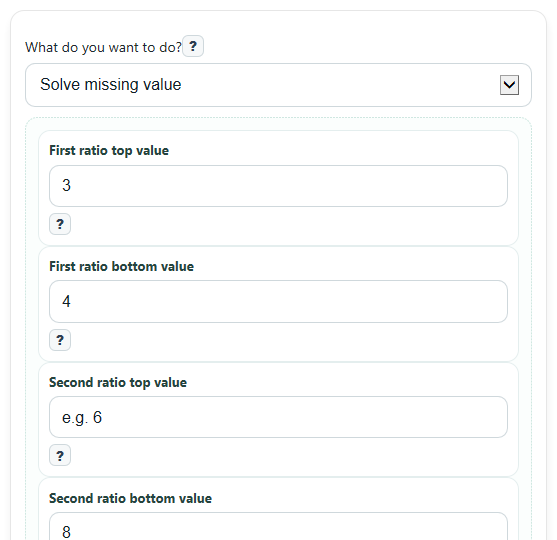
- Pick What do you want to do?, then enter the four boxes as the two ratios you want to compare.
- In Solve missing value mode, leave exactly one of these boxes blank: First ratio top value, First ratio bottom value, Second ratio top value, or Second ratio bottom value.
- Choose Decimal places if you want a shorter or more detailed decimal answer, then click Calculate.
- Read Answer first, then use Cross products and Steps to see how the diagonal products were formed and how the missing value was solved.
- Do a quick sanity check: if Cross products match in check mode, the ratios are equal; in solve mode, plug the Answer back into the blank box and make sure the two cross products now match.
Definitions
Ratio: A comparison of two numbers, often written like 3 to 4 or as the fraction 3/4.
Proportion: An equation that says two ratios are equal, such as a/b = c/d.
Cross products: The diagonal products in a proportion: a times d and b times c. If they are equal, the ratios match [3].
Denominator: The bottom number in a fraction. In this calculator, First ratio bottom value and Second ratio bottom value are denominators.
Exact value: A simplified fraction answer shown when possible, instead of only a rounded decimal.
Decimal places: The number of digits shown to the right of the decimal point in the displayed decimal answer.
Common mistakes and quick fixes
Mistake: Leaving two boxes blank in Solve missing value mode.
Fix: Enter three known values and leave only one of First ratio top value , First ratio bottom value , Second ratio top value , or Second ratio bottom value blank.
Mistake: Filling in all four boxes while still using Solve missing value mode.
Fix: Switch What do you want to do? to Check ratios match if you want to test a completed proportion.
Mistake: Entering 0 in First ratio bottom value or Second ratio bottom value .
Fix: Change the denominator so it is not 0, because division by 0 makes the proportion undefined.
Mistake: Typing a fraction like 1/2 into First ratio top value or another box.
Fix: Enter decimals or integers only, such as 0.5 instead of 1/2.
Mistake: Reading Answer but skipping Exact value when the decimal repeats.
Fix: Check Exact value to see the simplified fraction when the inputs allow it.
Mistake: Thinking unequal decimals mean the math is wrong when Decimal places is set low.
Fix: Increase Decimal places to see more digits, and use Cross products for the exact equality check.
Limitations & Key Assumptions / Boundary Conditions
- This calculator accepts integers and decimals, but not typed fractions with a slash such as 3/5.
- In Solve missing value mode, exactly one box must be blank. More than one blank or no blank will trigger an error.
- In Check ratios match mode, all four values are required.
- First ratio bottom value and Second ratio bottom value cannot be 0 because a fraction with denominator 0 is undefined.
- If the solved value is a repeating decimal, the decimal shown is rounded to the selected Decimal places.
- Exact value is most useful when the needed inputs are whole numbers; decimal inputs may not produce a simple fraction display.
- Cross multiplication is used only for proportions, meaning the two ratios are meant to be set equal before solving [1].
Methodology
How the calculator works
This calculator uses the cross-multiplication idea for proportions. If a/b = c/d, then the diagonal products are equal:
a times d = b times c, as long as the denominators are not 0 [1][1].
If a/b = c/d, then a*d = b*c
Solve mode
In Solve missing value mode, exactly one of the four boxes is blank. The calculator picks the matching solve rule based on which box is missing.
If a/b = x/d, then x = (a*d)/b
If a/b = c/x, then x = (b*c)/a
If x/b = c/d, then x = (b*c)/d
If a/x = c/d, then x = (a*d)/c
After solving, the calculator shows Answer, the diagonal product used in Cross products, and a short Steps explanation. When the inputs are integers, it can also show an Exact value as a simplified fraction.
Check mode
In Check ratios match mode, all four values must be filled in. The calculator multiplies both diagonals and compares them.
Left cross product = a*d
Right cross product = b*c
If those two products are the same, the ratios match. If they are different, the ratios do not match [3].
Mini example
Suppose you enter 3, 4, blank, and 8 in solve mode. The setup is 3/4 = x/8.
x = (3*8)/4 = 24/4 = 6
So the Answer is 6. Plugging it back in gives 3/4 = 6/8, and both cross products are 24.
Assumptions used
The calculator treats the entries as plain numbers with no units attached. It allows negative values, but it blocks any original denominator of 0. Decimal answers are rounded only for display, based on Decimal places, so a repeating decimal may look shortened even when the exact fraction is known.