
Convert between pH, pOH, hydrogen ion concentration [H+], and hydroxide ion concentration [OH-] with optional temperature-aware pKw.
Advanced options
How to use our Hydrogen Ion Concentration Calculator
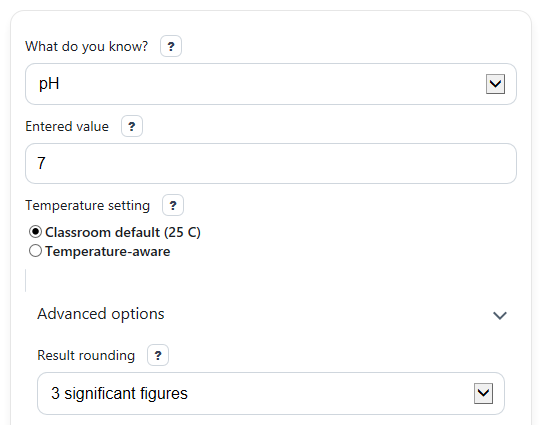
- Pick your starting value in What do you know?, then type it into Entered value. Use plain numbers for pH or pOH, and use mol/L scientific notation like 1e-7 for concentration values.
- Choose Temperature setting. Keep Classroom default (25 C) for the common pH + pOH = 14 shortcut, or choose Temperature-aware and enter Temperature (C).
- If you want, change Result rounding to control how many significant figures are shown. This changes display only, not the math.
- Click Calculate, then read Converted value first and compare it with pH, pOH, Hydrogen ion concentration [H+], Hydroxide ion concentration [OH-], and pKw used.
- Sanity-check the result: at one temperature, pH plus pOH should equal pKw used, and neutral water should match Neutral pH at this temperature.
Definitions
pH: A number that shows how acidic a solution is. Lower pH means more acidic.
pOH: A number that shows how basic a solution is. At one temperature, pH and pOH add up to pKw.
Hydrogen ion concentration [H+]: The approximate amount concentration of hydrogen ions in mol/L used in classroom equations.
Hydroxide ion concentration [OH-]: The approximate amount concentration of hydroxide ions in mol/L.
pKw: The negative base-10 log of Kw for water. It sets the link between pH and pOH.
Neutral pH: The pH where [H+] and [OH-] are equal in pure water at the chosen temperature.
Scientific notation: A short way to write very small numbers, such as 1e-7 for 0.0000001.
Activity: The strict chemistry idea behind pH. In many classroom problems, activity is approximated by concentration instead.
Common mistakes and quick fixes
Mistake: Typing text like 10^-7 or 1 x 10^-7 into Entered value for a concentration.
Fix: Enter concentration in Entered value as plain scientific notation, such as 1e-7, when What do you know? is set to Hydrogen ion concentration [H+] or Hydroxide ion concentration [OH-] .
Mistake: Entering 0 or a negative number for Hydrogen ion concentration [H+] or Hydroxide ion concentration [OH-] .
Fix: Concentration values in Entered value must be greater than 0 when that mode is selected.
Mistake: Assuming pH plus pOH always equals 14.
Fix: Check Temperature setting and read pKw used . The sum is 14 only in the Classroom default (25 C) mode.
Mistake: Thinking neutral water must always have pH 7.00.
Fix: Read Neutral pH at this temperature . In Temperature-aware mode, neutral pH can be different from 7.
Mistake: Reading a rounded display as if it were the exact value.
Fix: Use Result rounding to show more digits if needed, especially for very small Hydrogen ion concentration [H+] or Hydroxide ion concentration [OH-] values.
Mistake: Worrying that a pH below 0 or above 14 must be impossible.
Fix: The calculator can show those values when the math allows them. Use the Note output to understand that the usual 0 to 14 range is a classroom shortcut, not a hard rule.
Limitations & Key Assumptions / Boundary Conditions
- The default classroom mode fixes pKw at 14.00, which matches the common 25 C shortcut but not every real solution.
- Temperature-aware results depend on a built-in educational pKw table for 0 C to 100 C, so temperatures outside that range should be rejected.
- This calculator uses concentration-style classroom equations for [H+] and [OH-], while strict pH definitions are based on hydrogen ion activity.
- It is best for dilute aqueous solutions and basic school chemistry problems, not detailed lab-grade measurements.
- Very concentrated solutions can give pH or pOH values outside the usual 0 to 14 classroom range.
- Rounding changes only how results are displayed, so shown values may not multiply or add perfectly after rounding.
Methodology
Core relationships
The calculator starts from the one value you enter, then converts to the others using standard acid-base relationships for water.
pH = -log10([H+])
[H+] = 10^(-pH)
pOH = -log10([OH-])
[OH-] = 10^(-pOH)
pH + pOH = pKw
neutral pH = pKw / 2
How each mode is solved
If you enter pH, the calculator keeps that pH, finds pOH from pKw minus pH, then converts both scale values to concentrations.
If you enter pOH, it finds pH from pKw minus pOH, then converts to concentrations.
If you enter Hydrogen ion concentration [H+], it finds pH from the negative base-10 log, then gets pOH and [OH-] from pKw.
If you enter Hydroxide ion concentration [OH-], it finds pOH from the negative base-10 log, then gets pH and [H+] from pKw.
Temperature handling
In Classroom default (25 C) mode, the calculator uses pKw = 14.00. In Temperature-aware mode, it uses a built-in table over 0 C to 100 C and interpolates between nearby values so neutral pH can shift with temperature [1].
Worked mini-example
Example: enter What do you know? as pH, enter Entered value as 7.00, and use the 25 C classroom mode.
pOH = 14.00 - 7.00 = 7.00
[H+] = 10^(-7.00) = 1.00e-7 mol/L
[OH-] = 10^(-7.00) = 1.00e-7 mol/L
neutral pH = 14.00 / 2 = 7.00
So the solution is neutral in the 25 C classroom model.
Assumptions and limits
The calculator rejects zero or negative concentration inputs because logs of those values are not defined. It also checks for malformed scientific notation. For school use, it treats pH as linked to concentration, even though the strict definition is tied to hydrogen ion activity rather than simple concentration.