
Use this macro calculator to estimate daily calories plus protein, carbohydrates, and fat for maintenance, fat loss, or muscle gain.
Advanced options
How to use our Macro Calculator
- Choose your Unit system, then enter Sex, Age (years), height, Weight, Activity level, Goal, and Macro method.
- If your Goal is Lose fat or Gain muscle, open Advanced options and enter Calorie adjustment (percent of maintenance).
- If you choose Protein-first custom, also enter Protein target (g per kg body weight) and Fat target (g per kg body weight) in Advanced options.
- Click Calculate to get your Daily calorie target, Protein, Carbohydrates, Fat, and the Change from maintenance.
- Sanity-check the result: if Protein, Carbohydrates, or Fat looks unrealistic for your size or your Plan note says carbs are N/A, adjust the calorie target or your custom protein and fat settings.
Definitions
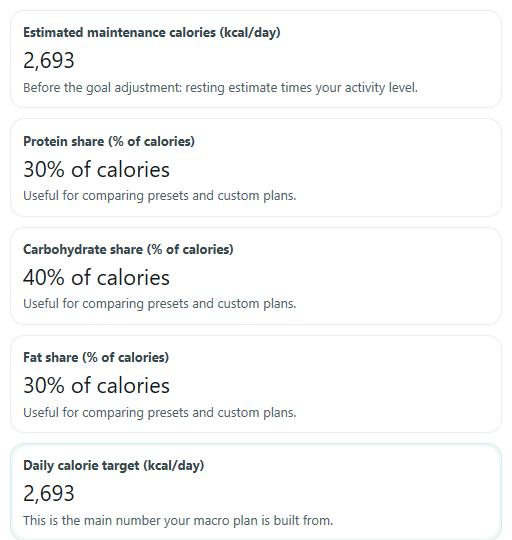
Daily calorie target: The calories per day your plan is built around after your goal adjustment.
Estimated maintenance calories: Your estimated calories per day to stay about the same weight before any cut or surplus is applied.
Protein: A macro counted in grams per day. In Protein-first custom mode, this target is set first from body weight.
Carbohydrates: A macro counted in grams per day. In Protein-first custom mode, carbs fill the calories left after protein and fat are assigned.
Fat: A macro counted in grams per day. Because fat has more calories per gram, small gram changes can move calories a lot.
Macro method: The rule used to split your calories into Protein, Carbohydrates, and Fat.
Protein share, Carbohydrate share, Fat share: The percent of total target calories coming from each macro.
Change from maintenance: Target calories minus maintenance calories. Negative means a deficit. Positive means a surplus.
Plan note: A short message that appears when a custom setup does not fit inside your calorie target, such as when carbs would need to be negative.
Common mistakes and quick fixes
Mistake: Entering Age (years) under 18.
Fix: Use this calculator only for adults and enter an Age (years) value of 18 or higher.
Mistake: Typing total height inches into Height (inches) when using US units.
Fix: Put the whole-foot part in Height (feet) and only the extra 0 to 11 inches in Height (inches).
Mistake: Leaving Calorie adjustment (percent of maintenance) blank when Goal is Lose fat or Gain muscle.
Fix: Enter a numeric percent for Calorie adjustment (percent of maintenance) or switch Goal to Maintain weight.
Mistake: Expecting Protein target (g per kg body weight) and Fat target (g per kg body weight) to change results in Balanced split, Higher protein, or Lower carb mode.
Fix: Those fields only affect results when Macro method is Protein-first custom.
Mistake: Using the wrong body weight field for your Unit system.
Fix: If Unit system is US, fill in Weight (lb). If Unit system is Metric, fill in Weight (kg).
Mistake: Treating Change from maintenance as always positive progress.
Fix: Read the sign: a negative Change from maintenance means a calorie deficit, and a positive value means a surplus.
Limitations & Key Assumptions / Boundary Conditions
- This calculator is intended for adults. It rejects Age (years) below 18.
- Estimated maintenance calories are only an estimate based on body size, sex, age, and Activity level. Real energy needs can differ.
- Preset macro modes use editorial percentage splits, not a personal medical or athletic assessment.
- In Protein-first custom mode, Carbohydrates are shown as N/A if your Daily calorie target is too low to fit the requested Protein and Fat targets.
- When Goal is Maintain weight, Calorie adjustment (percent of maintenance) is ignored.
- When Macro method is not Protein-first custom, Protein target (g per kg body weight) and Fat target (g per kg body weight) are ignored.
- Results are daily targets for planning only. They do not account for meal timing, food quality, or changing needs over time.
Methodology
How the calculator estimates calories
The calculator first estimates resting energy expenditure with the Mifflin-St Jeor equation, using your Sex, weight, height, and Age (years).
REE male = 10 x weight_kg + 6.25 x height_cm - 5 x age + 5
REE female = 10 x weight_kg + 6.25 x height_cm - 5 x age - 161
It then multiplies that resting estimate by an Activity level factor to get Estimated maintenance calories.
maintenance calories = REE x activity factor
The activity factors used here are fixed values: sedentary 1.2, light 1.375, moderate 1.55, very active 1.725, and extra active 1.9.
How the goal changes calories
If Goal is Maintain weight, the Daily calorie target equals Estimated maintenance calories. If Goal is Lose fat or Gain muscle, the calculator uses Calorie adjustment (percent of maintenance).
maintain: calorie target = maintenance calories
lose: calorie target = maintenance calories x (1 - goal pace/100)
gain: calorie target = maintenance calories x (1 + goal pace/100)
Change from maintenance is shown with its sign.
change from maintenance = calorie target - maintenance calories
A negative result means a deficit. A positive result means a surplus.
How preset macro modes work
For preset modes, the calculator splits calories by fixed percentages, then converts calories to grams. It uses 4 kcal per gram for protein, 4 kcal per gram for carbohydrates, and 9 kcal per gram for fat.
protein grams = calorie target x protein percent / 100 / 4
carb grams = calorie target x carb percent / 100 / 4
fat grams = calorie target x fat percent / 100 / 4 / 2.25
The preset splits are Balanced split 30/40/30, Higher protein 35/35/30, and Lower carb 35/25/40 for protein/carbs/fat.
How Protein-first custom works
This mode sets Protein and Fat from body weight first, then gives the remaining calories to Carbohydrates. This makes tradeoffs easier to see when calories are tight.
protein grams = protein g per kg x weight_kg
fat grams = fat g per kg x weight_kg
carb grams = (calorie target - 4 x protein grams - 9 x fat grams) / 4
If that carb result is negative, the plan is not feasible at the chosen calorie target. In that case, Carbohydrates are shown as N/A and the Plan note tells you to raise calories or lower the custom protein or fat settings.
How macro shares are shown
The percent outputs are calculated from the final gram targets and your Daily calorie target.
protein share = 4 x protein grams / calorie target x 100
carbohydrate share = 4 x carb grams / calorie target x 100
fat share = 9 x fat grams / calorie target x 100
Displayed grams are rounded to whole numbers, but the calculator keeps the unrounded math until the end. That is why the displayed percentages may not add to exactly 100 after rounding.
Mini example
Suppose a person has a Daily calorie target of 2,000 kcal and chooses Balanced split. Protein is 30%, carbs are 40%, and fat is 30%.
protein = 2000 x 0.30 / 4 = 150 g
carbohydrates = 2000 x 0.40 / 4 = 200 g
fat = 2000 x 0.30 / 9 = 66.7 g, shown as 67 g
In Protein-first custom mode, if the same 2,000 kcal target uses 140 g protein and 70 g fat, carbs get the remaining calories.
carbohydrates = (2000 - 4 x 140 - 9 x 70) / 4 = 202.5 g, shown as 203 g
Practical assumptions built into the math
This tool assumes adult users, standard body-size unit conversions, fixed activity multipliers, and stable day-to-day energy needs. Real-world results can differ because activity, body composition, and actual calorie intake are never perfectly steady.