
Enter a whole number to see its prime factorization, all positive factors, and a clear explanation of special cases like 0, 1, and negatives.
Advanced options
How to use our Prime Factorization Calculator
- Type a whole number into Number to factor. You can use a leading minus sign for a negative number, and commas or spaces are okay.
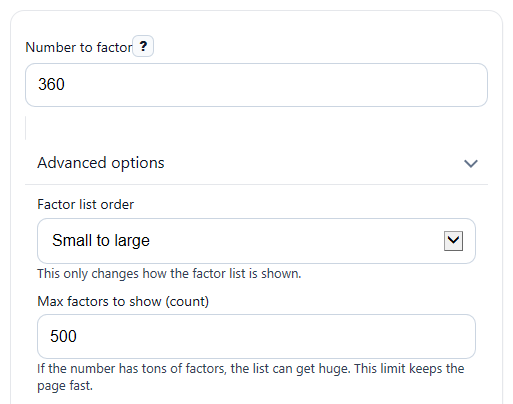
- If you want, open Advanced options and choose Factor list order or change Max factors to show (count) for long factor lists.
- Click Calculate to see Prime factorization, Prime factors written out, What kind of number it is, and the factor counts.
- Sanity-check the answer: multiply the primes in Prime factors written out to make sure they match your original number, or compare the grouped form in Prime factorization with your factor tree.
- Read Note if your input is 0, 1, negative, or too large, because those cases need special interpretation.
Definitions
Prime factorization: Writing a whole number greater than 1 as a product of prime numbers. For example, 360 = 2^3 x 3^2 x 5.
Prime number: A whole number greater than 1 with exactly two positive factors: 1 and itself [1].
Composite number: A whole number greater than 1 that is not prime, so it has more than two positive factors [1].
Prime factors written out: The full list of prime factors one by one, such as 2 x 2 x 2 x 3 x 3 x 5.
All positive factors: Every positive whole number that divides the input evenly, such as 1, 2, 3, 4, 6, and 12 for 12.
Different prime numbers used: How many distinct primes appear. In 360, the distinct primes are 2, 3, and 5, so the count is 3.
Prime factors counted with repeats: The total number of prime factors when repeats are included. For 360, that total is 6.
Exponent form: A short way to show repeated multiplication. For example, 2^3 means 2 x 2 x 2.
Common mistakes and quick fixes
Mistake: Typing a decimal such as 12.5 into Number to factor .
Fix: Enter a whole number only. Prime factorization works for integers, so use values like 12, 125, or -12.
Mistake: Thinking All positive factors should include negative factors too.
Fix: This output lists positive factors only. For -45, use the same positive factors as 45 and read Note for the negative-number explanation.
Mistake: Mixing up Prime factorization with Prime factors written out .
Fix: Prime factorization groups repeats with exponents, while Prime factors written out shows every prime one by one.
Mistake: Expecting 1 or 0 to have a normal answer in Prime factorization .
Fix: Check What kind of number it is and Note . The number 1 has no prime factorization, and 0 has no finite prime factorization.
Mistake: Assuming a negative prime like -13 should be labeled prime in What kind of number it is .
Fix: Prime and composite labels use the standard whole-number rule for numbers greater than 1, so read Note to see that -13 is -1 times 13.
Mistake: Thinking How many positive factors and Prime factors counted with repeats should be the same.
Fix: They measure different things. One counts all positive divisors, and the other counts only prime factors, including repeats.
Limitations & Key Assumptions / Boundary Conditions
- This calculator accepts whole numbers only. Decimals, fractions typed as decimals, blank entries, Infinity, and other non-integers are rejected.
- Negative inputs are factored by using the absolute value first, then the result is explained as -1 times that prime factorization.
- The All positive factors output lists positive factors only, not negative factors.
- The calculator treats 0, 1, and -1 as special cases. They do not have a standard prime factorization in the usual greater-than-1 sense.
- Exact integer math is limited to values within JavaScript's safe integer range, from -9007199254740991 to 9007199254740991.
- If a number has many factors, the displayed list can be shortened by Max factors to show (count) to keep results readable.
- Prime and composite classification follows the standard whole-number definition, so negative numbers are explained in Note instead of being labeled prime or composite in the usual way.
Methodology
How the calculator factors a number
The calculator first cleans the entry by removing spaces and commas, then checks that Number to factor is a whole number with an optional leading minus sign. If the input is negative, it factors the absolute value and adds a note explaining the original sign.
For numbers greater than 1, it divides by the smallest possible prime numbers and counts how many times each one goes in evenly. That creates the prime factorization [4].
n = p1^a1 x p2^a2 x ... x pk^ak
Here, n is the number, each p is a different prime, and each a tells how many times that prime repeats.
How the counts are found
The calculator uses the exponents from the prime factorization to count positive factors and to build the full factor list.
d(n) = (a1 + 1)(a2 + 1)...(ak + 1)
This gives How many positive factors for values with absolute value greater than 1.
factors = {p1^b1 x p2^b2 x ... x pk^bk | 0 <= bi <= ai}
That means each factor is made by choosing an exponent for each prime from 0 up to the maximum exponent in the factorization, then sorting the results.
Mini example
Suppose Number to factor is 360. Repeated division gives 360 = 2 x 2 x 2 x 3 x 3 x 5, so the grouped form is 2^3 x 3^2 x 5 [4]. The distinct primes are 2, 3, and 5, so Different prime numbers used is 3. The total prime count is 3 + 2 + 1 = 6, so Prime factors counted with repeats is 6.
d(360) = (3 + 1)(2 + 1)(1 + 1) = 24
So How many positive factors is 24.
Special cases
A prime number is a whole number greater than 1 with exactly two positive factors, 1 and itself [1]. A composite number is a whole number greater than 1 that is not prime [1]. The number 1 is neither prime nor composite and has no prime factorization. The number 0 does not have a finite prime factorization because it is divisible by every nonzero integer. For a negative input such as -45, the calculator factors 45 and explains that the original number is -1 x 3^2 x 5.
Assumptions used
The calculator shows positive factors only, uses exact integer arithmetic only within the safe integer range, and may shorten very long factor lists based on Max factors to show (count). Results are exact for supported whole-number inputs, but unsupported entries are blocked instead of guessed.