
Compare using the same cash for mortgage points or a bigger down payment, then see which choice costs less over your loan timeline.
Advanced options
Table of contents
How to use our Mortgage Points vs Down Payment Calculator
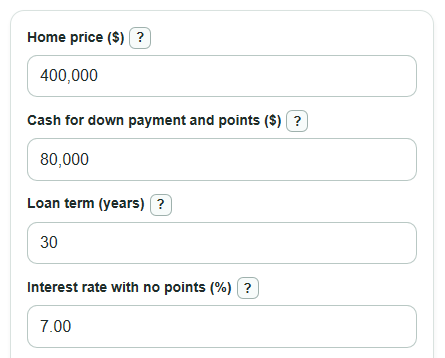
- Enter the Home price ($) and the Cash for down payment and points ($) you can use for these two choices only.
- Enter the Loan term (years), Interest rate with no points (%), Points to buy (points), and Interest rate after points (%) from your lender quotes.
- Enter How long you expect to keep the loan (months). Use the time until you expect to sell, refinance, or pay off the mortgage.
- If you want a rough PMI estimate, open Advanced options and enter PMI yearly rate (% of loan balance) and Stop PMI when loan reaches this price percent (%).
- Click Calculate, then sanity-check the answer: make sure Cash used to buy points is affordable and that Break-even month for buying points happens before the month you expect to leave the loan.
Definitions
Mortgage points: Upfront fees paid to the lender, often called discount points. One point equals 1% of the loan amount, and buyers usually pay points to get a lower interest rate [1].
Cash for down payment and points ($): The fixed cash budget this calculator splits between two choices: all cash to down payment, or part to points and the rest to down payment.
Loan amount if all cash goes to down payment: The home price minus the full cash budget. This is the no-points comparison loan.
Loan amount if part of cash buys points: The larger loan created when some of the same cash is spent on points instead of reducing the loan.
PMI: Private mortgage insurance, a cost that may apply when the down payment is small. It protects the lender, not the borrower [2].
Break-even month for buying points: The first month when the points choice has caught up and is cheaper than using the same cash as extra down payment.
Common mistakes and quick fixes
Mistake: Putting total closing cash into Cash for down payment and points ($) .
Fix: Enter only the money you can choose to use for the down payment or discount points, not taxes, prepaid insurance, escrow deposits, or other closing costs.
Mistake: Entering a guessed discount instead of the quoted Interest rate after points (%) .
Fix: Use the rate the lender actually offers after the Points to buy (points) , because each lender can price points differently.
Mistake: Reading a positive First-month payment change if buying points as a good result.
Fix: Positive means the points choice starts with a higher first payment; negative means it starts with a lower first payment.
Mistake: Ignoring How long you expect to keep the loan (months) and focusing only on the lower rate.
Fix: Compare your expected loan time with Break-even month for buying points ; points are less useful if you sell or refinance before break-even.
Mistake: Leaving PMI yearly rate (% of loan balance) at 0 when one choice may push the loan above your PMI cutoff.
Fix: If you have a PMI quote, enter it and check the PMI estimate note for how it affected the comparison.
Limitations & Key Assumptions / Boundary Conditions
- The comparison uses the same cash budget in both choices. Other closing costs, taxes, homeowners insurance, HOA fees, and seller credits are not included.
- The calculator uses fixed-rate mortgage math. It does not model adjustable-rate loans, temporary buydowns, negative amortization, or extra principal payments.
- PMI is only an estimate. It uses the entered PMI yearly rate (% of loan balance) and stops when the estimated loan balance reaches the entered price percent. Real PMI rules, cancellation timing, and quotes can differ.
- The home price is treated as constant for loan-to-price checks. Home value changes, appraisals, and lender-specific loan-to-value rules are not modeled.
- If How long you expect to keep the loan (months) is longer than the loan term, the comparison stops at the payoff month.
- The result can change if the lender changes fees, points pricing, rate locks, loan program rules, or minimum down payment requirements.
Methodology
Same-cash comparison
The calculator builds two loans from the same Home price ($) and Cash for down payment and points ($). In the down-payment choice, all cash reduces the loan. In the points choice, point cost comes out of that same cash budget, so the down payment is smaller and the loan is larger.
loan_down = home_price - cash_budget
loan_points = (home_price - cash_budget) / (1 - points_to_buy / 100)
point_cost = (points_to_buy / 100) * loan_points
down_payment_points = home_price - loan_points
Monthly payment and balance
Each loan uses the standard fixed-rate principal and interest payment formula. The annual rate is divided by 100 and then by 12 to get the monthly rate. The term in months is Loan term (years) times 12.
if monthly_rate = 0, payment = loan_amount / term_months
otherwise payment = loan_amount * monthly_rate * (1 + monthly_rate)^term_months / ((1 + monthly_rate)^term_months - 1)
For the remaining balance after the months you keep the loan, the calculator uses the amortization balance formula.
if monthly_rate = 0, balance_m = loan_amount - payment * paid_months
otherwise balance_m = loan_amount * (1 + monthly_rate)^paid_months - payment * ((1 + monthly_rate)^paid_months - 1) / monthly_rate
PMI estimate
If PMI yearly rate (% of loan balance) is greater than 0, PMI is estimated month by month from the beginning balance for each loan. The editable default stop point is 80% of the home price, which matches a common loan-to-value reference for PMI discussions [2].
if pmi_annual_rate > 0 and beginning_balance / home_price > pmi_stop_ltv / 100, pmi_month = beginning_balance * (pmi_annual_rate / 100) / 12
otherwise pmi_month = 0
Total cost and break-even
The comparison cost is not the full lifetime cost unless you keep the loan for the full term. It counts principal and interest payments made through the entered time, estimated PMI through that time, and the remaining balance at that time. The upfront cash budget is the same in both choices, so it is not added to either side.
cost_scenario = principal_interest_payment * paid_months + pmi_total + remaining_balance_after_paid_months
cost_saved_by_points = cost_down - cost_points
A positive Cost saved by buying points instead of adding down payment means buying points is lower cost for the entered time. A negative value means using the same cash as down payment is lower cost. The first-month payment change compares the first payment in the points choice with the first payment in the down-payment choice.
first_month_payment_change_with_points = (payment_points + first_pmi_points) - (payment_down + first_pmi_down)
For break-even, the calculator checks each month from 1 through the loan term and returns the first month where the points choice is at least as good as the down-payment choice. If that never happens, it reports that buying points does not break even within the loan term.
Mini-example
Suppose the home price is $1,000, cash budget is $200, loan term is 1 year, the no-points rate is 12%, the buyer buys 1 point, the after-points rate is 0%, and PMI is 0. The no-points loan is $800. The points loan is $808.08 because the $8.08 point cost comes out of the same $200 cash budget. The down payment left after points is $191.92. Over 12 months, the points choice saves about $44.87, and the first-month payment is about $3.74 lower. The break-even month is month 2.