
Use this MLVSS Calculator to find mixed liquor volatile suspended solids in mg/L or total MLVSS mass in an aeration basin.
How to use our MLVSS Calculator
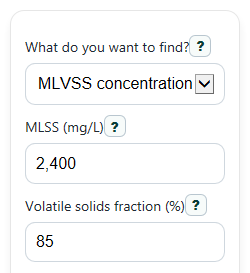
- Choose What do you want to find? Pick MLVSS concentration if you need a concentration in mg/L, or Total MLVSS in basin if you need total mass in the tank.
- Enter MLSS (mg/L) and Volatile solids fraction (%). Use the actual volatile percentage as a percent from 0 to 100, not a decimal.
- If you chose total-mass mode, also enter Aeration basin volume (MG) and pick Total mass unit as pounds or kilograms.
- Click Calculate, then read MLVSS concentration first. In total-mass mode, also read Total MLVSS in basin and the Result note so you do not mix concentration with total mass.
- Sanity-check the answer: Organic part of MLSS should match your entered Volatile solids fraction (%), and Non-volatile part of MLSS should equal 100 minus that value.
Definitions
MLSS (mg/L): Mixed liquor suspended solids. This is the total suspended solids concentration in the aeration tank.
Volatile solids fraction (%): The percent of MLSS that is volatile solids, often used as the organic part of the mixed liquor.
MLVSS concentration: Mixed liquor volatile suspended solids concentration. It is the volatile, or organic, part of MLSS, shown in mg/L.
Organic part of MLSS: The share of MLSS that is volatile solids, shown as a percent. In this calculator, it matches the entered volatile fraction.
Non-volatile part of MLSS: The part of MLSS that is not volatile solids, shown as a percent. It equals 100% minus the volatile fraction.
Aeration basin volume (MG): The mixed liquor volume in the basin, measured in million gallons.
Total MLVSS in basin: The total mass of volatile suspended solids in the basin, shown in pounds or kilograms.
Common mistakes and quick fixes
Mistake: Entering Volatile solids fraction (%) as 0.85 when you mean 85%.
Fix: Type the percent value directly in Volatile solids fraction (%). For 85%, enter 85, not 0.85.
Mistake: Using zero or a negative number for MLSS (mg/L).
Fix: Enter MLSS (mg/L) as a value greater than 0 before you calculate.
Mistake: Putting basin volume into Aeration basin volume (MG) in gallons instead of MG.
Fix: Convert the basin volume to million gallons first, then enter that number in Aeration basin volume (MG).
Mistake: Comparing MLVSS concentration directly to Total MLVSS in basin as if they were the same kind of answer.
Fix: Read MLVSS concentration as mg/L and Total MLVSS in basin as lb or kg. Use the Result note to keep the two answers separate.
Mistake: Forgetting to change Total mass unit before reading Total MLVSS in basin.
Fix: Check Total mass unit first so the mass result is shown in the unit you want.
Mistake: Expecting Aeration basin volume (MG) to affect MLVSS concentration mode.
Fix: In MLVSS concentration mode, only MLSS (mg/L) and Volatile solids fraction (%) are used.
Limitations & Key Assumptions / Boundary Conditions
- This calculator uses the entered Volatile solids fraction (%) directly. It does not estimate the fraction from plant type, sludge age, or any other operating data.
- MLVSS concentration is calculated from MLSS (mg/L) and volatile fraction only. If your lab data are wrong or unrepresentative, the result will also be wrong.
- Total MLVSS in basin depends on Aeration basin volume (MG). Enter volume in million gallons, not gallons or cubic feet.
- The total-mass result is based on the standard wastewater conversion factor 8.34 for mg/L and MG to pounds. Unit mistakes will cause large errors.
- The calculator keeps concentration results and total-mass results separate, but it does not tell you whether a value is good or bad for your process.
- This tool does not calculate related process-control values such as F/M ratio, solids inventory by multiple basins, or wasting requirements.
Methodology
Core calculation
The calculator first finds the volatile part of the mixed liquor from the total solids concentration and the volatile percentage.
MLVSS_mgL = MLSS_mgL x (volatile_percent / 100)
This gives MLVSS concentration in mg/L.
Support check outputs
The percent outputs help you confirm that the split between volatile and non-volatile solids makes sense.
organic_fraction_percent = (MLVSS_mgL / MLSS_mgL) x 100
fixed_fraction_percent = 100 - volatile_percent
With valid inputs, Organic part of MLSS should equal the entered Volatile solids fraction (%).
Total mass mode
If you choose Total MLVSS in basin, the calculator converts concentration to total mass using basin volume in million gallons.
MLVSS_lb = MLVSS_mgL x basin_volume_MG x 8.34
MLVSS_kg = MLVSS_lb x 0.45359237
The 8.34 factor is the standard wastewater conversion from mg/L over MG to pounds. The kilogram conversion uses 0.45359237 kg per pound.
Worked example
Suppose MLSS (mg/L) is 2400 and Volatile solids fraction (%) is 85.
MLVSS_mgL = 2400 x (85 / 100) = 2040 mg/L
organic_fraction_percent = (2040 / 2400) x 100 = 85%
fixed_fraction_percent = 100 - 85 = 15%
If Aeration basin volume (MG) is 0.50, then:
MLVSS_lb = 2040 x 0.50 x 8.34 = 8506.8 lb
This example shows why concentration and total mass answer different questions: 2040 mg/L is the basin concentration, while 8506.8 lb is the total volatile solids mass in that basin.
Assumptions and limits
This method assumes MLSS and volatile fraction come from representative testing and that basin volume is entered correctly in MG. It does not correct for sampling error, multiple basin zones, or changing solids concentration within the tank.