
Use this calculator to find a fuel's heat of combustion and the total energy released for a chosen amount, with a clear water-basis choice.
Advanced options
How to use our Heat of Combustion Calculator
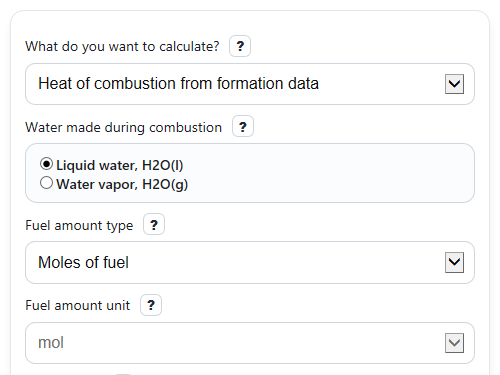
- Choose What do you want to calculate?, then enter either Fuel formula and Fuel heat of formation (kJ/mol) or a known Heat of combustion value with its matching Heat of combustion unit.
- Set Water made during combustion to liquid water or water vapor, then enter Fuel amount type, Fuel amount unit, and Fuel amount.
- If you use a mass amount with a per-mole value, enter Molar mass (g/mol). You can also open Advanced options to edit the product formation values or choose how the main result is shown.
- Click Calculate, then check Balanced combustion reaction and Oxygen needed first to make sure the fuel formula and combustion setup look reasonable.
- Read Heat of combustion as the signed reaction enthalpy and Released energy for the amount entered as the positive amount of energy released by your sample.
Definitions
Heat of combustion: The enthalpy change for complete burning of 1 mole of fuel. By sign convention, it is usually negative because heat is released.
Released energy for the amount entered: The positive size of the heat released by your sample, shown in kJ and MJ.
Fuel heat of formation (kJ/mol): The standard enthalpy of formation of the fuel. It is the reactant formation value used in the products-minus-reactants calculation.
Water made during combustion: The assumed state of the product water. Liquid water gives an HHV-like result, while water vapor gives an LHV-like result for fuels that contain hydrogen [1].
Molar mass (g/mol): The mass of 1 mole of fuel. It lets the calculator convert between mass and moles.
Energy per mass (MJ/kg): The released-energy magnitude on a mass basis, useful for comparing fuels by weight.
Oxygen needed: The moles of O2 required to burn 1 mole of fuel completely.
Balanced combustion reaction: The complete combustion equation built from the fuel formula and the chosen water basis.
Common mistakes and quick fixes
Mistake: Entering a mass in Fuel amount but leaving Fuel amount unit on mol.
Fix: If your sample is in grams or kilograms, change Fuel amount unit to g or kg so the total energy uses the right basis.
Mistake: Using Heat of combustion value in kJ/g while Heat of combustion unit is still set to kJ/mol.
Fix: Match Heat of combustion unit to the number you entered before trusting Released energy for the amount entered .
Mistake: Forgetting Molar mass (g/mol) when converting between mass and a per-mole combustion value.
Fix: Enter a positive Molar mass (g/mol) whenever you use mass with a molar Heat of combustion value or when you want Energy per mass from a molar result.
Mistake: Typing an unsupported or malformed Fuel formula , such as one with elements other than C, H, O, S, or N.
Fix: Use a simple whole-number formula like CH4, C2H5OH, or CH3OH and then recheck Balanced combustion reaction .
Mistake: Thinking Heat of combustion should always be positive.
Fix: A signed reaction enthalpy is usually negative for combustion, while Released energy for the amount entered is shown as a positive magnitude.
Mistake: Switching Water made during combustion without noticing how it changes hydrogen-containing fuels.
Fix: Compare Heat of combustion and read Water basis note ; liquid water gives a more negative HHV-like result than water vapor for fuels that make water.
Limitations & Key Assumptions / Boundary Conditions
- This version only supports fuel formulas made from C, H, O, S, and optional N with whole-number atom counts.
- The calculation assumes complete combustion to CO2, H2O, SO2, and N2. It does not model incomplete combustion products such as CO, soot, or NOx.
- Formation-data results depend on the standard enthalpy values you enter for the fuel and products. Different tables or phases can shift the answer slightly.
- The water-basis switch matters only when the fuel produces water. If the fuel has no hydrogen, choosing liquid water or water vapor will not change the combustion enthalpy.
- Mass-to-mole conversions require a valid positive Molar mass (g/mol). Wrong molar mass gives wrong total energy and wrong Energy per mass.
- The tool rejects chemically unrealistic cases that imply zero or negative oxygen demand for combustion-fuel use.
- Results are standard-state thermochemistry values, so real burners, engines, and calorimeters can differ because of temperature, pressure, excess air, moisture, and heat losses.
Methodology
Core idea
Heat of combustion is the enthalpy change for complete burning of a fuel. In chemistry, that reaction enthalpy is usually negative, but people often talk about the amount of energy released as a positive number.
Step 1: Build the combustion reaction
The calculator reads the Fuel formula as CxHyOzSwNn and forms complete-combustion products CO2, H2O, SO2, and N2.
CxHyOzSwNn + a O2 -> x CO2 + (y/2) H2O + w SO2 + (n/2) N2
a = x + y/4 + w - z/2
The Oxygen needed output is this value of a, in mol O2 per mol fuel. If a is zero or negative, the calculator stops with an error instead of showing a misleading combustion result.
Step 2: Find standard heat of combustion from formation data
When you choose Heat of combustion from formation data, the calculator uses the standard products-minus-reactants enthalpy method [1]. O2(g) and N2(g) have formation enthalpy 0 in their standard states.
DeltaH_comb = sum(nu_p x DeltaHf_products) - sum(nu_r x DeltaHf_reactants)
For C, H, O, S fuels, that becomes:
DeltaH_comb = x DeltaHf(CO2) + (y/2) DeltaHf(H2O) + w DeltaHf(SO2) - DeltaHf(fuel)
The H2O term uses either H2O(l) heat of formation (kJ/mol) or H2O(g) heat of formation (kJ/mol), depending on Water made during combustion. Liquid water gives a more negative HHV-like value, while water vapor gives an LHV-like value for hydrogen-containing fuels [2].
Step 3: Convert to total released energy
To find the energy released by your sample, the calculator multiplies fuel amount by the magnitude of the combustion value.
Q_released = n_fuel x abs(DeltaH_comb)
If you enter a known combustion number in Heat of combustion value, the calculator keeps your sign meaning straight: a negative entry is treated as signed reaction enthalpy, and a positive entry is treated as released-energy magnitude. It can then show either view, or both, based on Show the main result as.
Step 4: Convert mass and moles when needed
If your fuel amount is a mass but your combustion value is per mole, the calculator converts mass to moles using Molar mass (g/mol).
n_fuel = m_fuel / M
Here, m_fuel is in grams and M is in g/mol. If you enter kilograms, the calculator first converts kg to g.
For the mass-based comparison output, the calculator uses:
Energy per mass (MJ/kg) = abs(DeltaH_comb) / M
Because 1 kJ/g = 1 MJ/kg, dividing kJ/mol by g/mol gives MJ/kg directly.
Mini example
For methane, CH4, with liquid-water products and a fuel formation value of -74.8 kJ/mol, the balanced reaction is CH4 + 2 O2 -> CO2 + 2 H2O. Using DeltaHf(CO2) = -393.51 kJ/mol and DeltaHf(H2O(l)) = -285.83 kJ/mol:
DeltaH_comb = [1(-393.51) + 2(-285.83)] - [1(-74.8)] = -890.37 kJ/mol
So the signed Heat of combustion is -890.37 kJ/mol, and the positive released-energy magnitude is 890.37 kJ for 1 mol. With water vapor instead, the result is less negative because gaseous water keeps some energy in the vapor state.
How to interpret the outputs
A more negative Heat of combustion means more heat released per mole. A larger positive Released energy for the amount entered means your chosen sample gives more total energy. Check Balanced combustion reaction and Water basis note first if the answer seems off.
Assumptions used
The calculator assumes complete combustion, standard-state formation data, and no side products. Real-world heating values and measured combustion energy can differ because of temperature, pressure, fuel impurities, moisture, and incomplete condensation of water.