
Estimate your computer's monthly electricity cost from watts, daily use time, electricity price, and optional monitor or sleep power.
Advanced options
Table of contents
How to use our Computer Electricity Cost Calculator
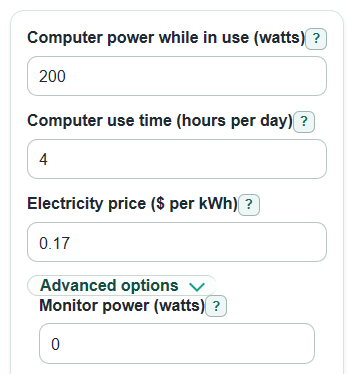
- Enter Computer power while in use (watts). A wall power meter is best; a power supply rating is usually a maximum, not normal use.
- Enter Computer use time (hours per day) and Electricity price ($ per kWh). If your bill has many charges, divide the total electric bill by total kWh for a closer price.
- Open Advanced options if you want to include Monitor power (watts), Monitor on time (hours per day), Sleep or off power (watts), Sleep or off time (hours per day), or a custom Billing month length (days).
- Select Calculate and read Estimated monthly cost first, then use Daily energy use and Monthly energy use to compare the computer with your electric bill.
- Sanity-check the result: if the cost looks too high, make sure watts are not a power supply maximum, hours are per day, and the electricity price is in dollars per kWh, such as 0.17 instead of 17.
Definitions
Watt: A unit of power. Power is how fast a device uses electricity at one moment.
Kilowatt: 1,000 watts. A 200-watt computer is 0.2 kilowatts.
Kilowatt-hour (kWh): A unit of energy used by electric bills. It means using 1 kilowatt for 1 hour.
Electricity price ($ per kWh): The cost for each kilowatt-hour. This can vary by place, season, plan, and bill charges [1].
Computer power while in use (watts): The watts used while the computer is awake and being used. It is not always the same as the power supply rating.
Sleep or off power (watts): Power used while the computer is asleep, off, in standby, or plugged in.
Billing month length (days): The number of days used to turn a daily estimate into Estimated monthly cost.
Common mistakes and quick fixes
Mistake: Using the power supply rating for Computer power while in use (watts) .
Fix: Use a wall power meter or a realistic in-use estimate, because the power supply label is usually a maximum.
Mistake: Entering cents in Electricity price ($ per kWh) , such as 17 instead of 0.17.
Fix: Convert cents to dollars before entering the price, so 17 cents becomes 0.17.
Mistake: Counting the same hours in both Computer use time (hours per day) and Sleep or off time (hours per day) .
Fix: Use awake-use hours for the first label and only extra plugged-in hours for the sleep or off label.
Mistake: Leaving out Monitor power (watts) for a desktop setup, then trusting Estimated monthly cost as the full setup cost.
Fix: Add the watts for all monitors together, or enter 0 only when you want computer-only cost.
Mistake: Setting Monitor on time (hours per day) higher than the monitor is really on.
Fix: Match the monitor hours to actual screen-on time, which may be less than computer awake time.
Mistake: Comparing Monthly energy use with a bill that has a different number of days than Billing month length (days) .
Fix: Enter the number of days on that bill when you want a closer bill-to-calculator comparison.
Limitations & Key Assumptions / Boundary Conditions
- The result is an estimate. Real computer watts change with games, video calls, charging, idle time, fan speed, and background tasks.
- A power supply label is not the same as actual power draw. If you enter that maximum rating, the cost may be too high.
- The calculator assumes the entered daily pattern repeats every day of the billing month or year.
- Computer use time (hours per day) plus Sleep or off time (hours per day) must not be more than 24 because those are different computer states in one day.
- Monitor power (watts) is counted only for Monitor on time (hours per day). Other accessories, speakers, printers, docks, and network gear are not included unless you add their watts to a matching input.
- The calculator uses the entered Electricity price ($ per kWh). Taxes, tiered rates, time-of-use prices, demand charges, and fixed monthly fees can make a real bill differ.
- Estimated yearly cost uses 365 days. It does not adjust for leap years or seasonal changes in your use pattern.
Methodology
How the estimate is calculated
Watts measure power at a specific moment, while watt-hours measure electricity used over time [3]. The calculator first turns each device state into watt-hours per day, then divides by 1,000 to get kilowatt-hours.
computer_wh_per_day = computer_power_w * computer_hours_per_day
monitor_wh_per_day = monitor_power_w * monitor_hours_per_day
sleep_wh_per_day = sleep_power_w * sleep_hours_per_day
daily_energy_kwh = (computer_wh_per_day + monitor_wh_per_day + sleep_wh_per_day) / 1000
Cost is energy multiplied by the electricity price you enter. Prices can differ by location and other factors, so your own bill rate is the best input when you have it [1].
daily_cost = daily_energy_kwh * electricity_rate_per_kwh
monthly_cost = daily_cost * billing_days_per_month
yearly_cost = daily_cost * 365
The one-hour cost uses the computer watts plus monitor watts, because it answers what one more in-use hour costs when the monitor is included.
one_hour_in_use_cost = ((computer_power_w + monitor_power_w) / 1000) * electricity_rate_per_kwh
The sleep or off cost is separated so you can see the part caused by plugged-in standby-style power.
sleep_or_off_monthly_cost = (sleep_power_w * sleep_hours_per_day / 1000) * electricity_rate_per_kwh * billing_days_per_month
Mini example
If a computer uses 200 watts for 4 hours per day at $0.17 per kWh, the computer uses 800 watt-hours per day, which is 0.8 kWh per day. The daily cost is 0.8 * 0.17 = $0.136, and an average 30.4375-day month costs about $4.14.