
Calculate a property's cap rate, target value, price gap, or needed NOI before loans and income taxes.
Table of contents
How to use our Cap Rate Calculator
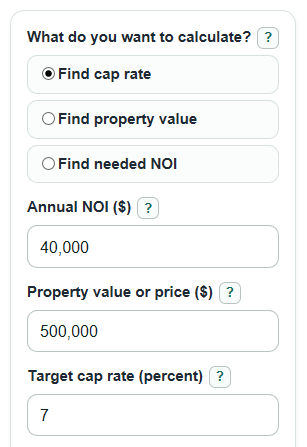
- Choose What do you want to calculate? based on the missing number: Find cap rate, Find property value, or Find needed NOI.
- Enter Annual NOI ($) as yearly net operating income before loan payments and income taxes.
- Enter Property value or price ($) and Target cap rate (percent) when they are shown for your selected mode.
- Click Calculate and read the first result first, then use Value at your target cap rate or Price gap to target to compare the deal with your target.
- Sanity-check the output: a 7% target cap rate means about $7 of yearly NOI for each $100 of property value, before financing.
Definitions
Cap rate: Annual NOI divided by Property value or price ($), shown as a percent. It compares yearly property income with price before loans and income taxes.
Annual NOI ($): Net operating income for one year. It is property income after normal operating expenses, before debt payments and income taxes.
Property value or price ($): The purchase price, asking price, or market value used in the cap rate calculation.
Target cap rate (percent): The cap rate you want the property to meet, entered as a percent such as 7 for 7%.
Value at your target cap rate: The property value implied by Annual NOI ($) and Target cap rate (percent).
Price gap to target: Value at your target cap rate minus Property value or price ($). Positive means the target value is above the entered price; negative means the entered price is above the target value.
Price to NOI: Property value divided by Annual NOI ($). It shows how many years of current NOI equal the property value, before financing and taxes.
Common mistakes and quick fixes
Mistake: Entering rent collected as Annual NOI ($).
Fix: Use Annual NOI ($) after normal operating expenses, not total rent.
Mistake: Subtracting mortgage payments before entering Annual NOI ($).
Fix: Keep Annual NOI ($) before loan payments and income taxes.
Mistake: Typing 0.07 in Target cap rate (percent) for a 7% target.
Fix: Enter 7 in Target cap rate (percent); the calculator converts percent to a decimal internally.
Mistake: Reading Price gap to target as always bad when it is negative.
Fix: A negative Price gap to target means the entered Property value or price ($) is above the value implied by your target cap rate.
Mistake: Comparing Cap rate across properties that use different expense rules.
Fix: Make Annual NOI ($) consistent before comparing Cap rate, especially for repairs, taxes, insurance, and management costs.
Limitations & Key Assumptions / Boundary Conditions
- The calculator is a direct cap rate tool, not a full real estate investment model.
- Annual NOI ($) must be estimated consistently. Different choices for repairs, reserves, management fees, or vacancy can change the result.
- Cap rate does not include mortgage terms, closing costs, future rent growth, sale price, income taxes, or depreciation.
- Negative Annual NOI ($) is allowed because some properties lose money before financing, but negative implied values are not practical purchase values.
- Target cap rates are personal or market-based. The calculator does not decide whether a target rate is fair for a property type, location, or risk level.
- Price to NOI is shown as N/A when Annual NOI ($) is 0 because dividing by zero is not valid.
Methodology
Core calculation
Cap rate is calculated by dividing yearly net operating income by property value, then converting the decimal rate to a percent. Direct capitalization uses the relationship between income, value, and rate [1].
cap_rate_percent = (annual_noi / property_value) * 100
The calculator keeps Annual NOI ($) before financing, so mortgage payments and income taxes are not subtracted from NOI.
Reverse calculations
To find Property value at target cap rate, the calculator divides Annual NOI ($) by Target cap rate (percent) after converting the percent to a decimal.
property_value_result = annual_noi / (target_cap_rate / 100)
To find Needed annual NOI, the calculator multiplies Property value or price ($) by the target cap rate as a decimal.
required_noi = property_value * (target_cap_rate / 100)
required_monthly_noi = required_noi / 12
Target comparison
In Find cap rate mode, the calculator also shows the value implied by your Target cap rate (percent), then compares it with the entered Property value or price ($). The sign is kept because it is useful.
target_value_at_rate = annual_noi / (target_cap_rate / 100)
price_gap_to_target = target_value_at_rate - property_value
A positive Price gap to target means the target value is higher than the entered price. A negative Price gap to target means the entered price is higher than the value implied by your target.
Supporting output
Price to NOI is calculated only when Annual NOI ($) is not 0.
value_to_noi_multiple = property_value / annual_noi
Mini-example
If Annual NOI ($) is $40,000 and Property value or price ($) is $500,000, the cap rate is 8% because $40,000 divided by $500,000 equals 0.08. If Target cap rate (percent) is 7, the value at your target cap rate is $571,428.57, and the Price gap to target is $71,428.57.