
Estimate the rear-side power boost and yearly energy gain for a bifacial solar array using simple site assumptions.
Advanced options
Table of contents
How to use our Bifacial Solar Gain Calculator
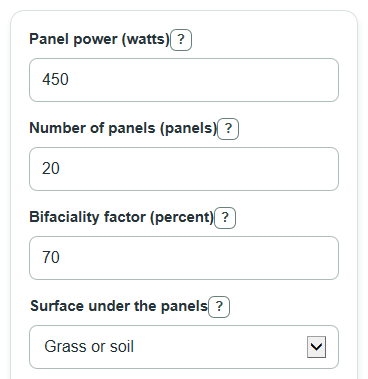
- Enter Panel power and Number of panels from the panel datasheet and array plan.
- Enter the Bifaciality factor, then choose Surface under the panels; use Custom albedo when selected only if you choose Custom albedo.
- Enter Average peak sun hours for your site so the calculator can turn the power boost into yearly energy.
- Open Advanced options if you want to change Likely rear light access, Low rear light access, or High rear light access.
- Check that the likely boost sits between the low and high estimates; if it does not, adjust the rear light access values before using the yearly energy estimate.
Definitions
Bifaciality factor: How strong the back side of the panel is compared with the front side under test conditions. A 70 percent value means the back can produce 70 percent as much as the front under the same light.
Albedo: The share of light a surface reflects. An albedo of 0.25 means the surface reflects about 25 percent of the light that hits it.
Rear light access: The share of reflected light that reaches the back of the panels. Open ground-mount layouts usually have more rear light access than tight or blocked layouts.
Peak sun hours: A way to express solar resource as the number of full-sun hours per day. It is used here to estimate yearly energy.
Front-side system size: The panel front-side watts multiplied by the number of panels, shown in kilowatts.
Rear-side power boost: The estimated extra power from the back side as a percent of front-side power.
Common mistakes and quick fixes
Mistake: Using total array watts in Panel power instead of watts for one panel.
Fix: Enter the front-side rated watts for one panel, then put the panel quantity in Number of panels .
Mistake: Typing a non-whole value in Number of panels .
Fix: Enter a whole panel count, such as 20, because the model counts complete panels.
Mistake: Treating Bifaciality factor as the expected gain percent.
Fix: Enter how strong the back side is compared with the front, such as 70 for 70 percent, and let the calculator apply albedo and rear light access.
Mistake: Choosing Surface under the panels as Custom albedo but leaving Custom albedo when selected blank or outside 0 to 1.
Fix: Enter a decimal albedo from 0 to 1, such as 0.25 for 25 percent reflectance.
Mistake: Entering annual sunshine in Average peak sun hours .
Fix: Enter the average hours per day, such as 4.5, not yearly kWh or total daylight hours.
Mistake: Setting Low rear light access higher than High rear light access .
Fix: Make the low value the cautious case and the high value the optimistic case, both from 0 to 1.
Limitations & Key Assumptions / Boundary Conditions
- This is a screening estimate, not an engineering production model or a bankable solar forecast.
- The rear-side boost uses bifaciality, albedo, and rear light access only. It does not model panel height, tilt, row spacing, shade, racking, wire trays, snow cover changes, or hourly sun angle.
- Surface albedo presets are broad planning values. Real reflectance changes with dirt, moisture, snow age, season, roof color, and sun angle.
- Annual energy is based on average peak sun hours times 365 days. It does not subtract inverter losses, clipping, temperature losses, soiling, downtime, degradation, or front-side shading.
- The low and high boost values are sensitivity checks. They show how much the answer moves when rear light access changes, not a guaranteed production range.
- If the likely rear light access is outside the low-to-high range, the likely result can still calculate, but the sensitivity range no longer surrounds the main case.
Methodology
Calculation steps
The calculator first selects albedo from the surface menu. The preset albedo values are 0.75 for snow, 0.65 for a white roof or bright coating, 0.35 for light concrete, 0.25 for grass or soil, and 0.10 for a dark roof. If Custom albedo is selected, the entered custom value is used instead.
front_system_kw = panel_power_w * panel_count / 1000
rear_boost_percent = (bifaciality_percent / 100) * albedo * rear_view_factor * 100
low_boost_percent = (bifaciality_percent / 100) * albedo * low_view_factor * 100
high_boost_percent = (bifaciality_percent / 100) * albedo * high_view_factor * 100
rear_added_power_kw = front_system_kw * rear_boost_percent / 100
total_effective_power_kw = front_system_kw + rear_added_power_kw
front_annual_kwh = front_system_kw * peak_sun_hours * 365
extra_annual_kwh = front_annual_kwh * rear_boost_percent / 100
bifacial_annual_kwh = front_annual_kwh + extra_annual_kwh
Mini-example
For 20 panels at 450 W each, the front-side system size is 450 * 20 / 1000 = 9.00 kW. With a 70 percent bifaciality factor, grass or soil albedo of 0.25, and likely rear light access of 0.60, the rear-side boost is (70 / 100) * 0.25 * 0.60 * 100 = 10.5 percent.
With 4.5 average peak sun hours, the front-side annual energy estimate is 9.00 * 4.5 * 365 = 14782.5 kWh/year. The estimated extra rear-side energy is 14782.5 * 10.5 / 100 = 1552.16 kWh/year, and the estimated total bifacial energy is 16334.66 kWh/year.
Validation used
The calculator rejects blank required entries, malformed thousands commas, panel power at or below zero, non-whole panel counts, bifaciality outside 0 to 100 percent, albedo outside 0 to 1, peak sun hours outside 0 to 24, rear light access outside 0 to 1, and a low rear light access value that is higher than the high rear light access value.