
Enter your loan amount, rate, term, and interest-only years to see the payment jump when principal payments begin.
Table of contents
How to use our Interest-Only Loan Calculator
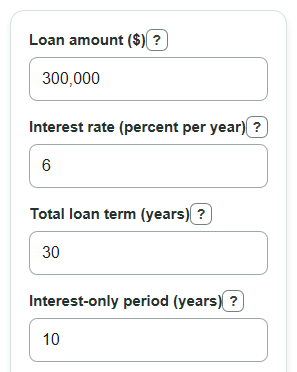
- Enter the Loan amount as the amount borrowed, not the home price or purchase price.
- Enter the Interest rate as the yearly rate on the loan, then enter the Total loan term in years.
- Enter the Interest-only period in years; it must be shorter than the Total loan term.
- Click Calculate and compare the Interest-only monthly payment with the Monthly payment after interest-only period.
- Sanity-check the output: a longer Interest-only period usually leaves fewer months to pay down the loan balance, so the later monthly payment is usually higher.
Definitions
Loan amount: The amount borrowed. It is the starting principal balance used in the payment formulas.
Interest rate: The yearly interest rate entered as a percent per year. The calculator divides it by 12 to get a monthly rate.
Interest-only period: The part of the loan term when payments cover interest but do not lower the loan balance [1].
Monthly payment after interest-only period: The monthly principal-and-interest payment needed to pay off the same loan balance over the remaining months.
Months left to pay down the loan balance: The number of monthly payments left after the interest-only period ends.
Total interest paid over full loan: The interest portion of all modeled payments, not including the original amount borrowed.
Common mistakes and quick fixes
Mistake: Entering the home price in Loan amount instead of the amount borrowed.
Fix: Use the actual loan principal after any down payment.
Mistake: Typing Interest rate as a monthly rate, such as 0.5, when you mean 6 percent per year.
Fix: Enter the yearly Interest rate shown on the loan, such as 6 for 6 percent per year.
Mistake: Making Interest-only period equal to or longer than Total loan term.
Fix: Shorten the Interest-only period so there are months left to pay down the loan balance.
Mistake: Reading Interest-only monthly payment as a payment that reduces the balance.
Fix: Remember that Interest-only monthly payment covers interest only; the Loan amount stays the same during that period.
Mistake: Planning only for Interest-only monthly payment and ignoring Monthly payment increase after interest-only period.
Fix: Use Monthly payment increase after interest-only period to check whether the later payment fits your budget.
Limitations & Key Assumptions / Boundary Conditions
- The calculation assumes a fixed interest rate for the full loan. Adjustable-rate loans can change when the rate resets.
- The payment amounts exclude property taxes, homeowners insurance, mortgage insurance, HOA fees, closing costs, late fees, and other loan charges.
- The model assumes no extra payments, no missed payments, no refinance, and no change to the loan balance during the interest-only period.
- The Total loan term must be longer than the Interest-only period, because the loan needs time left to pay down principal.
- The yearly Interest rate is treated as a nominal annual rate split into 12 monthly periods.
- Real lender disclosures may round each monthly payment to the nearest cent, so final totals can differ by a few cents.
Methodology
How the two payment phases are calculated
The calculator uses the same loan balance in both phases because interest-only payments do not reduce principal. First it converts the yearly Interest rate into a monthly rate.
monthly_rate = annual_rate_percent / 100 / 12
Then it finds the interest-only payment.
io_monthly_payment = loan_amount * monthly_rate
Next it finds the months left after the interest-only period.
remaining_months = total_term_years * 12 - interest_only_years * 12
If the monthly rate is greater than 0, the later monthly payment uses the standard fixed-payment loan formula.
after_io_monthly_payment = loan_amount * monthly_rate * (1 + monthly_rate)^remaining_months / ((1 + monthly_rate)^remaining_months - 1)
If the rate is exactly 0, the later payment is the loan amount divided by the remaining months.
after_io_monthly_payment = loan_amount / remaining_months
The payment jump is the later payment minus the interest-only payment.
payment_increase = after_io_monthly_payment - io_monthly_payment
Total paid adds the payments from both phases, and total interest subtracts the original loan amount.
total_paid_over_loan = io_monthly_payment * interest_only_years * 12 + after_io_monthly_payment * remaining_months
total_interest_paid = total_paid_over_loan - loan_amount
Mini example
For a $300,000 loan at 6 percent per year, with a 30-year total term and a 10-year interest-only period, the monthly rate is 0.005. The interest-only payment is $1,500.00. There are 240 months left to pay down the loan balance, so the later monthly payment is $2,149.29. The monthly payment increase is $649.29, and the total interest paid over the full modeled loan is $395,829.85.
Sources
- What is an "interest-only" loan? | Consumer Financial Protection Bureau - Consumerfinance
- OCC (Office of the Comptroller of the Currency) - Interest-Only Mortgage Payments and Payment-Option ARMs (PDF) - Treas
- Interest-Only Mortgage: Pros & Cons | Chase.com - Chase
- Fannie Mae (PDF) - Months to Amortization: for interest-only loans, months from current month to first scheduled principal-and-interest payment date - Fanniemae