
Estimate combined Parent PLUS loan payments, total repayment cost, fees withheld, and net school amount for one or more loan rows.
Table of contents
How to use our Parent PLUS Loan Calculator
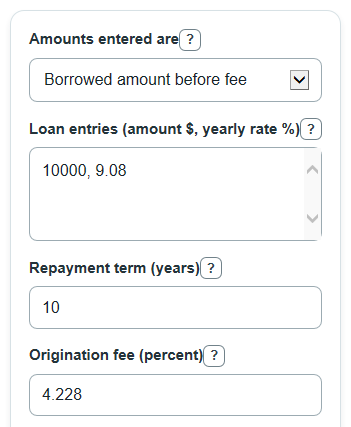
- Choose Amounts entered are based on what your loan amounts mean: borrowed amount before the fee or net school amount after the fee.
- In Loan entries (amount $, yearly rate %), enter each loan as amount, rate, such as 10000, 9.08; 5000, 8.05.
- Enter the Repayment term in years and the Origination fee percent that applies to the loans you want to estimate.
- Click Calculate, then review Combined monthly payment, Total repaid over the term, and Total interest paid first.
- Sanity-check the output by comparing Loan rows included with the number of rows you typed and by checking that Estimated amount reaching the school matches your school bill goal.
Definitions
Parent PLUS loan: A federal Direct PLUS Loan made to a parent borrower to help pay a dependent student's education costs.
Borrowed amount before fee: The loan principal used for repayment. Interest and monthly payments are based on this amount.
Net school amount after fee: The estimated dollars left after the origination fee is withheld from the borrowed amount.
Origination fee: A percentage fee taken out of the loan before the money reaches the school.
Yearly rate: The annual interest rate for a loan row, entered as a percent.
Repayment term: The number of years used to spread the loans into equal monthly payments.
Total interest paid: Total repaid over the term minus the total borrowed before fees.
Common mistakes and quick fixes
Mistake: Choosing the wrong Amounts entered are setting for the numbers in the loan box.
Fix: Pick borrowed amount before fee if your entries are loan principal amounts, or net school amount after fee if your entries are the dollars you need the school to receive.
Mistake: Typing Loan entries (amount $, yearly rate %) without a comma between amount and rate.
Fix: Use one amount, rate pair per loan, such as 10000, 9.08, and separate loans with semicolons or new lines.
Mistake: Entering a monthly rate instead of a yearly rate in Loan entries (amount $, yearly rate %) .
Fix: Enter the yearly interest rate percent for each row, such as 9.08 for 9.08% per year.
Mistake: Leaving Repayment term blank or entering 0 years.
Fix: Enter a positive number of years, such as 10, so the calculator can split repayment into monthly payments.
Mistake: Treating Origination fee as a dollar amount instead of a percent.
Fix: Enter the fee rate as a percent, such as 4.228, not the dollar fee withheld.
Mistake: Reading Total repaid over the term as extra cost only.
Fix: Use Total interest paid for the interest cost, and use Total repaid over the term for all scheduled payments combined.
Limitations & Key Assumptions / Boundary Conditions
- This is an estimate, not a federal servicer quote or a repayment-plan approval decision.
- The calculator uses equal monthly payments over the repayment term. It does not model graduated, income-driven, deferment, forbearance, late fees, capitalization events, or extra payments.
- All loan rows use the same Amounts entered are choice and the same Origination fee percent.
- Interest rates must be entered by the user. Different Parent PLUS loans can have different yearly rates, so check each loan row before relying on the combined result.
- The origination fee default is an editable example. Replace it if your loan used a different fee.
- Money results are rounded to cents for display, but the calculation keeps unrounded values until the final output.
- If a loan has special servicing rules or a payoff schedule that is not fixed-payment amortization, real payment amounts can differ.
Methodology
How each loan row is read
Each loan row must contain one dollar amount and one yearly interest rate percent. The calculator rejects rows with missing values, negative rates, nonpositive amounts, ranges, formulas, or extra numbers because silently skipping a bad row would make the combined payment misleading.
fee_decimal = origination_fee_percent / 100
net_factor = 1 - fee_decimal
If Amounts entered are is borrowed amount before fee, the entered amount is the repayment principal.
principal_i = entered_amount_i
net_i = principal_i * net_factor
fee_i = principal_i * fee_decimal
If Amounts entered are is net school amount after fee, the calculator grosses up the amount so the selected net amount is left after the fee.
net_i = entered_amount_i
principal_i = net_i / net_factor
fee_i = principal_i - net_i
Monthly payment math
The repayment term is converted to months using 12 months per year. Each row uses the standard fixed-payment amortization formula. A zero-rate row is allowed and is divided evenly over the months.
months = repayment_term_years * 12
monthly_rate_i = (yearly_rate_percent_i / 100) / 12
payment_i = principal_i * monthly_rate_i / (1 - (1 + monthly_rate_i)^(-months))
if monthly_rate_i = 0, payment_i = principal_i / months
Combined totals
After each row is calculated, the calculator adds the row payments and row principal amounts to produce one combined repayment estimate.
combined_monthly_payment = add all payment_i
total_repaid = combined_monthly_payment * months
gross_amount_borrowed = add all principal_i
net_amount_received = add all net_i
origination_fee_total = add all fee_i
total_interest_paid = total_repaid - gross_amount_borrowed
Mini-example
Suppose one row is 10000, 9.08, the repayment term is 10 years, and the origination fee is 4.228%. If the amount is a borrowed amount before fee, the principal is $10,000. The estimated fee withheld is $422.80, and the estimated amount reaching the school is $9,577.20. With 120 monthly payments and a 9.08% yearly rate, the monthly payment is about $127.11. Total repaid is about $15,253.13, so total interest paid is about $5,253.13.