
Calculate vacancy rate from empty units, occupied units, empty days, or rent collected, with occupancy rate and optional rent impact.
Table of contents
How to use our Vacancy Rate Calculator
- Choose What do you want to use? based on the information you already have: empty units, occupied units, empty days, or rent collected.
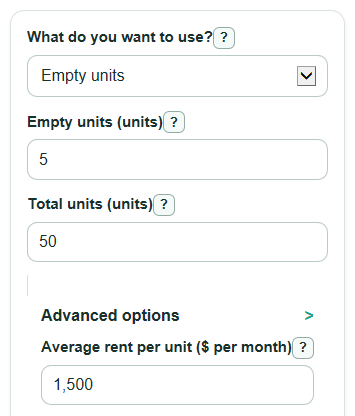
- Enter only the visible required fields, such as Empty units and Total units, or Possible rent if full and Rent actually collected.
- Open Advanced options only if you want Estimated rent not earned to include Average rent per unit, Rent-impact period, or Turnover cost.
- Click Calculate, then check Method used and Empty amount used to make sure the calculator used the same kind of data you meant to enter.
Definitions
Vacancy rate: The share of units, days, or possible rent that is empty, unused, or not collected. A physical vacancy rate is often based on unoccupied rental units [1].
Occupancy rate: The share that is occupied, used, or collected. In this calculator, it equals 100% minus the vacancy rate.
Empty units: Rentable units that are available but not occupied.
Total units: All rentable units in the property, room block, or group being measured.
Empty days: Days a unit was empty. For several units, each empty unit for one day counts as 1 unit-day.
Possible rent if full: The rent that could have been collected if every unit was rented and paid for during the same period.
Rent actually collected: The rent received for that same period, after vacancy, missed rent, discounts, or concessions.
Estimated rent not earned: A planning estimate of rent missed because of vacancy, or the rent gap in rent-collected mode.
Common mistakes and quick fixes
Mistake: Entering Occupied units while What do you want to use? is set to Empty units.
Fix: Change the mode to Occupied units, or enter the number of empty units in Empty units .
Mistake: Putting only one building's count in Total units when Empty units covers several buildings.
Fix: Make Total units cover the same property group as Empty units .
Mistake: Using regular calendar days in Days in the period while Empty days is entered as unit-days for several units.
Fix: For a portfolio time rate, use total available unit-days in Days in the period .
Mistake: Comparing Vacancy rate from Rent actually collected with a unit-based vacancy rate as if they measure the same thing.
Fix: Read Method used ; rent-collected mode measures economic vacancy, not just empty space.
Mistake: Leaving Average rent per unit at a value that does not match the units counted in Empty units .
Fix: Use the average monthly rent for the same type of unit, or enter 0 if you do not want a rent-impact estimate.
Mistake: Treating a negative Estimated rent not earned as an error in rent-collected mode.
Fix: Check Possible rent if full and Rent actually collected ; a negative value means collected rent is higher than the possible rent you entered.
Limitations & Key Assumptions / Boundary Conditions
- Unit modes need Total units greater than 0, and Empty units or Occupied units cannot be greater than Total units.
- Empty-days mode treats Empty days and Days in the period as matching units. For several units, use unit-days for both the empty amount and total available time.
- Rent-collected mode measures economic vacancy. It can include vacancy, unpaid rent, concessions, and collection problems, so it is not the same as a physical empty-unit rate.
- Actual rent may be higher than Possible rent if full. In that case, the calculator keeps the negative vacancy rate instead of forcing it to 0.
- Estimated rent not earned for empty-days mode is 0 in this calculator because no daily rent input is included.
- Estimated vacancy cost is a planning estimate, not a tax, appraisal, or accounting result.
Methodology
How the calculator chooses the formula
The selected What do you want to use? mode decides which inputs are read. Hidden mode-specific inputs do not affect the answer.
For empty-unit mode, the calculator divides Empty units by Total units and multiplies by 100.
vacancy_rate_percent = vacant_units / total_units * 100
For occupied-unit mode, it first finds empty units by subtracting Occupied units from Total units.
vacancy_rate_percent = (total_units - occupied_units) / total_units * 100
For empty-days mode, it divides Empty days by Days in the period.
vacancy_rate_percent = vacant_days / period_days * 100
For rent-collected mode, it measures the gap between Possible rent if full and Rent actually collected, then divides by possible rent. This is an economic vacancy calculation [1].
vacancy_rate_percent = (potential_rent - actual_rent) / potential_rent * 100
Occupancy rate is the complement of vacancy rate.
occupancy_rate_percent = 100 - vacancy_rate_percent
Rent impact
For empty-unit and occupied-unit modes, the rent estimate uses empty units, Average rent per unit, and Rent-impact period.
lost_rent_period = empty_units * avg_rent_per_unit * rent_impact_months
For rent-collected mode, the rent estimate is the signed rent gap.
lost_rent_period = potential_rent - actual_rent
Estimated vacancy cost adds Turnover cost to the rent estimate.
total_vacancy_cost = lost_rent_period + turnover_cost
Mini-example
If a property has 5 Empty units and 50 Total units, the vacancy rate is 5 / 50 * 100 = 10%. The occupancy rate is 100% - 10% = 90%. If Average rent per unit is $1,500 and Rent-impact period is 1 month, estimated rent not earned is 5 * $1,500 * 1 = $7,500.