
Convert miles to yards or yards to miles fast, with a clear rounding setting and the standard conversion rule shown for easy checking.
Table of contents
How to use our Miles to Yards Converter
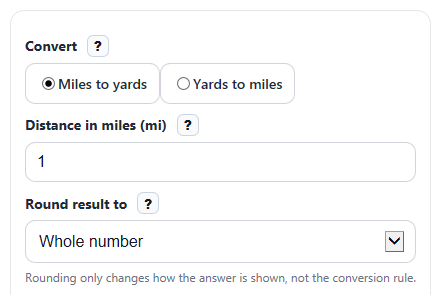
- Choose a direction under Convert: Miles to yards or Yards to miles.
- Enter your value in the visible field: Distance in miles (mi) or Distance in yards (yd).
- Pick a setting in Round result to if you want a whole number or a certain number of decimal places.
- Click Calculate to see Converted distance, Conversion rule used, and Reverse rule.
- Sanity-check the answer: 1 mile should equal 1,760 yards, and 880 yards should equal 0.5 miles, so your result should match that pattern.
Definitions
Distance in miles (mi): The starting distance when you are converting from miles to yards.
Distance in yards (yd): The starting distance when you are converting from yards to miles.
Round result to: How many decimal places the calculator shows in the final answer.
Converted distance: The distance after changing from the starting unit to the other unit.
Conversion rule used: The exact standard relationship the calculator applied, such as 1 mile = 1,760 yards.
Reverse rule: The opposite conversion relationship, useful for checking your work or switching directions.
Common mistakes and quick fixes
Mistake: Typing into Distance in miles (mi) while Convert is set to Yards to miles .
Fix: Enter the number only in the visible active field for the chosen Convert direction.
Mistake: Leaving Distance in miles (mi) or Distance in yards (yd) blank and expecting 0.
Fix: Type a real number. If your distance is zero, enter 0 so the calculator can return a valid Converted distance .
Mistake: Choosing the wrong Round result to setting and thinking the math changed.
Fix: Remember that Round result to only changes how many decimals are shown in Converted distance , not the conversion rule.
Mistake: Multiplying by 1,760 when using Yards to miles .
Fix: Check Conversion rule used . In that mode, yards are divided by 1,760 to get miles.
Mistake: Thinking a negative Converted distance means the calculator is broken.
Fix: A negative value usually means your starting number was a signed change in distance. Recheck the number you entered in Distance in miles (mi) or Distance in yards (yd) .
Limitations & Key Assumptions / Boundary Conditions
- This converter uses the fixed standard rule 1 mile = 1,760 yards, so it is for ordinary distance unit conversion only.
- Rounding can hide small decimal differences on screen when you choose fewer decimal places in Round result to.
- Negative values are allowed mathematically, but they usually represent a signed change in distance rather than distance traveled.
- The calculator converts only between miles and yards; it does not compare pace, time, or other units.
- If the active visible input is blank or not a valid number, the calculator should show an error instead of estimating a result.
Methodology
How the conversion works
The calculator uses one fixed relationship: 1 mile equals 1,760 yards [2]. It applies that rule in one of two directions based on Convert.
yards = miles * 1760
miles = yards / 1760
Worked mini-example
If Convert is set to Miles to yards and you enter 2.5 in Distance in miles (mi), the calculator multiplies by 1,760.
yards = 2.5 * 1760 = 4400
So the Converted distance is 4,400 yd.
If Convert is set to Yards to miles and you enter 880 in Distance in yards (yd), the calculator divides by 1,760.
miles = 880 / 1760 = 0.5
So the Converted distance is 0.5 mi.
How rounding is applied
The calculator first computes the full conversion, then formats the displayed answer using your Round result to choice. This means rounding changes the shown value, not the underlying rule.
Input handling and edge cases
Only the visible active field is used. If you choose Miles to yards, the yards field is ignored. If you choose Yards to miles, the miles field is ignored. A value of 0 returns 0 in the destination unit. Negative values stay negative so signed distance changes are not lost.
Assumptions behind the result
This method assumes you want the standard mile-to-yard relationship used in customary length conversion [2]. Real-world context, such as road distance, track layout, or map measurement, may involve separate measurement or rounding choices before you convert units.