
Convert ppm to mg/L or mg/L to ppm for water or other liquids by choosing either the 1:1 water shortcut or a custom density.
Advanced options
Table of contents
How to use our PPM to mg/L Converter
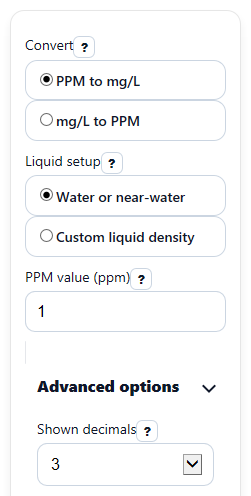
- Choose Convert to tell the calculator whether you are going from PPM value to mg/L value or the other way around.
- Pick a Liquid setup: use Water or near-water when the liquid is close to 1 g/mL, or Custom liquid density when you know the actual Liquid density (g/mL).
- Enter your starting concentration in the visible source field, then set Shown decimals to control how the answer is displayed.
- Click Calculate and read Converted value together with Result unit so you copy both the right number and the right unit.
- Sanity-check the result by reading Assumption note and Difference from 1:1 water shortcut: if the difference is not close to 0%, the simple water shortcut would noticeably change the answer.
Definitions
PPM: Parts per million. In this calculator, it is treated as a mass-by-mass concentration, equivalent to mg of solute per kg of solution in dilute liquid work.
mg/L: Milligrams per liter. This means how many milligrams of solute are in 1 liter of solution.
Liquid density (g/mL): The mass of each milliliter of liquid. Density connects mass-based ppm to volume-based mg/L.
Water or near-water: The shortcut mode that assumes density is 1 g/mL, so ppm and mg/L are taken as equal for the chosen model.
Custom liquid density: The mode that uses your entered density instead of assuming 1 g/mL.
Difference from 1:1 water shortcut: The percent amount by which the custom-density result is above or below the simple water-style 1:1 conversion.
Common mistakes and quick fixes
Mistake: Entering a number in PPM value while Convert is set to mg/L to PPM.
Fix: Use the source field that matches the selected direction: PPM value for PPM to mg/L, or mg/L value for mg/L to PPM.
Mistake: Leaving Liquid setup on Water or near-water for a liquid that is not close to water.
Fix: Switch to Custom liquid density and enter Liquid density (g/mL) greater than 0.
Mistake: Treating Converted value as correct without checking the unit.
Fix: Always read Result unit before copying the answer into a report, worksheet, or dosing step.
Mistake: Entering a negative concentration in PPM value or mg/L value .
Fix: Enter 0 or more unless your work specifically allows negative values as a math exercise.
Mistake: Using 0 or a negative number for Liquid density (g/mL) .
Fix: Enter a density greater than 0 g/mL when Custom liquid density is selected.
Mistake: Thinking a rounded display changed the chemistry.
Fix: If the answer seems too rough, increase Shown decimals and compare the updated Converted value .
Limitations & Key Assumptions / Boundary Conditions
- This calculator is for liquid solutions and makes the concentration basis explicit: ppm is treated as mass-per-mass, while mg/L is mass-per-volume.
- In Water or near-water mode, the result uses a fixed 1 g/mL assumption. That is appropriate for the shortcut model, but it is not a universal rule for every liquid.
- In Custom liquid density mode, accuracy depends on the entered Liquid density (g/mL). A wrong density gives a wrong conversion.
- The tool does not adjust density for temperature, dissolved solids, pressure, or mixture behavior. Real samples can shift with conditions.
- Very concentrated or unusual liquids may not behave like dilute water-based examples, so the 1:1 shortcut can be misleading.
- Results are rounded for display according to Shown decimals, so the visible value may be slightly rounded even when the internal calculation is straightforward.
Methodology
Core idea
This converter uses two different models because ppm and mg/L are not the same kind of unit. PPM is treated as mass per mass, while mg/L is mass per volume. They match only under the water-style shortcut where density is 1 g/mL or very close to it [3].
Equations used
Water shortcut: mg/L = ppm
Water shortcut: ppm = mg/L
Custom density, ppm to mg/L: mg/L = ppm x density
Custom density, mg/L to ppm: ppm = (mg/L) / density
Percent difference from water shortcut = ((custom result - water shortcut result) / water shortcut result) x 100
Why density matters
If density is 1 g/mL, then 1 liter of solution has a mass of about 1 kilogram. That makes 1 mg/kg line up with 1 mg/L, so ppm and mg/L come out equal in the water shortcut model. If density is not 1 g/mL, the volume-based and mass-based values separate, so the custom-density equation must be used [3].
Worked mini-example
Suppose Convert is set to PPM to mg/L, Liquid setup is Custom liquid density, PPM value is 10, and Liquid density (g/mL) is 0.95.
mg/L = 10 x 0.95 = 9.5
The water shortcut would have given 10 mg/L instead.
Difference from 1:1 water shortcut = ((9.5 - 10) / 10) x 100 = -5%
That negative sign means the custom-density result is lower than the simple water shortcut.
Rounding and edge handling
The calculator allows zero concentration and returns zero in the target unit. Negative concentration entries are blocked. If the water-shortcut comparison would divide by zero, the difference is shown as 0% when both paths are zero; otherwise it should be treated as not available.
Assumptions used here
This tool assumes a liquid solution, uses density in g/mL, and follows the exact formulas listed above. It does not estimate density from temperature or composition, so lab-specific or process-specific conditions can produce different real-world values.