
Use this Mbps calculator to convert internet speed units and estimate how long a download or upload will take.
Advanced options
How to use our Mbps Calculator
- Choose "What do you want to figure out?" and pick either Transfer time or Speed conversion.
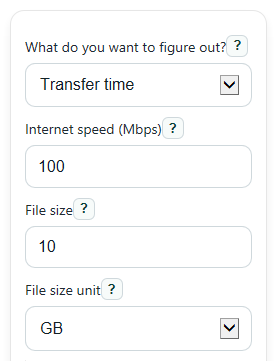
- For Transfer time, enter "Internet speed (Mbps)", then enter "File size" and choose the matching "File size unit" such as GB or GiB.
- For Speed conversion, enter "Speed to convert", choose "Convert from", and if needed open Advanced options to set "Show converted speed as".
- If you want a more realistic time estimate, open Advanced options and lower "Connection efficiency (%)" below 100 to reflect overhead or slower real-world performance.
- Click Calculate, then sanity-check the result by comparing "Effective transfer rate" and "Common speed conversions" to the MB/s or Mbps numbers you usually see in apps, launchers, or speed tests.
Definitions
Mbps: Megabits per second. This is a network speed unit, and internet plans usually advertise speed this way.
MB/s: Megabytes per second. Many apps show download speed this way, and 1 byte equals 8 bits.
File size unit: The size label attached to "File size", such as MB, GB, TB, MiB, GiB, or TiB.
Decimal units: MB, GB, and TB use powers of 1000 bytes.
Binary units: MiB, GiB, and TiB use powers of 1024 bytes.
Connection efficiency (%): The usable share of the headline speed after protocol overhead, Wi-Fi limits, server limits, or other slowdowns.
Effective transfer rate: The working rate used for the estimate after converting units and applying efficiency.
Bytes per second (B/s): The base byte rate behind the shown speed conversions.
Common mistakes and quick fixes
Mistake: Entering "Internet speed (Mbps)" as if Mbps and MB/s mean the same thing.
Fix: Remember that Mbps uses bits and MB/s uses bytes. Check "Effective transfer rate" and "Common speed conversions" to compare them.
Mistake: Choosing the wrong "File size unit" for a file listed as GiB or MiB.
Fix: Match "File size unit" to the exact unit you see. Do not switch GB to GiB unless the file is actually shown that way.
Mistake: Leaving "Connection efficiency (%)" at 100 when your real transfer is slower than the plan speed.
Fix: Lower "Connection efficiency (%)" to estimate a more realistic transfer time after overhead and slowdowns.
Mistake: Using "Speed to convert" while still thinking in file size terms.
Fix: In "What do you want to figure out?" choose "Speed conversion" only for unit changes, and choose Transfer time when you need time for a file.
Mistake: Forgetting to change "Show converted speed as" when comparing with a browser or game launcher.
Fix: Set "Show converted speed as" to the same unit the app shows, such as MB/s or KB/s.
Mistake: Entering 0 or a negative number for "Internet speed (Mbps)" or "File size".
Fix: Use values greater than 0, or the calculator will show an error instead of a result.
Limitations & Key Assumptions / Boundary Conditions
- Transfer time is an estimate based on the entered "Internet speed (Mbps)", chosen "File size unit", and optional "Connection efficiency (%)".
- The calculator assumes the transfer speed stays steady for the whole file. Real transfers often speed up or slow down.
- A setting of 100% for "Connection efficiency (%)" gives ideal math, not a guaranteed real-world result.
- The selected "File size unit" is binding. GB and GiB are treated differently and are not swapped automatically.
- Results do not account for device storage speed, server throttling, network congestion, or pauses and retries during a transfer.
- In Speed conversion mode, the tool converts units only. It does not judge whether your connection can actually hold that rate in practice.
Methodology
How the calculator works
The calculator does two jobs. In Transfer time mode, it turns "Internet speed (Mbps)" into bytes per second, adjusts for "Connection efficiency (%)" if used, and divides the file size by that working rate. In Speed conversion mode, it converts the entered speed from the source unit to the display unit you chose.
Core formulas
bytes_per_second = bits_per_second / 8
1 Kbps = 1000 bps; 1 Mbps = 1000^2 bps; 1 Gbps = 1000^3 bps
1 MB = 1000^2 B; 1 GB = 1000^3 B; 1 TB = 1000^4 B
1 MiB = 1024^2 B; 1 GiB = 1024^3 B; 1 TiB = 1024^4 B
time_seconds = file_bytes / bytes_per_second
time_seconds = file_bytes / (bytes_per_second * efficiency_pct / 100)
target_value = source_value * source_to_bps / target_to_bps
Mini example
Suppose your speed is 100 Mbps and your file is 10 GB with "Connection efficiency (%)" set to 100. First convert 100 Mbps to bits per second: 100 x 1,000,000 = 100,000,000 bps. Then convert to bytes per second: 100,000,000 / 8 = 12,500,000 B/s, which is 12.5 MB/s. Next convert 10 GB to bytes: 10 x 1,000,000,000 = 10,000,000,000 B. Finally divide file size by rate: 10,000,000,000 / 12,500,000 = 800 seconds, which is 13 minutes 20 seconds.
If you keep the same file and speed but change "Connection efficiency (%)" to 80, the working rate becomes 12.5 MB/s x 0.80 = 10 MB/s. Using bytes, the transfer time is:
10,000,000,000 B / 10,000,000 B/s = 1,000 seconds, which is 16 minutes 40 seconds.
How to interpret the results
The "Main answer" is the estimate most people want first. "Effective transfer rate" shows the speed actually used in the math, which helps explain why a 100 Mbps plan may look like about 12.5 MB/s at best. "Common speed conversions" helps you compare the same speed across app-style and ISP-style units.
Assumptions behind the math
This tool uses standard unit conversions and assumes a steady transfer rate. It does not model changing Wi-Fi signal strength, server speed limits, packet loss, or device read and write limits. That is why real downloads and uploads can differ even when the unit conversion is correct.