
Convert data sizes between bits, bytes, decimal units, and binary units while seeing the full unit list and the MB vs MiB difference clearly.
Advanced options
How to use our Byte Conversion Calculator
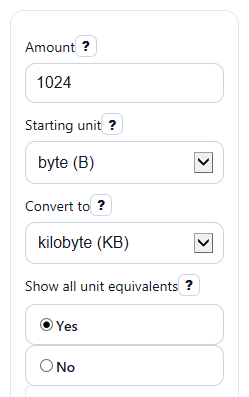
- Enter your Amount, then choose the matching Starting unit so the calculator knows what your number means now.
- Pick your target in Convert to for the main answer, and leave Show all unit equivalents on if you want every supported unit listed below.
- Open Advanced options if you want to change Decimal places or switch Large number style to scientific notation for very large or tiny values.
- Click Calculate and read Converted amount first, then check Which unit usually fits best and Note to avoid mixing bits with bytes or MB with MiB.
- Do a quick sanity check: if you convert 1024 byte (B) to kibibyte (KiB), the result should be 1, while 1000 byte (B) to kilobyte (KB) should also be 1.
Definitions
Bit (b): The smallest data unit in this calculator. Eight bits make one byte.
Byte (B): A basic data unit used for file sizes and storage. One byte equals 8 bits.
Decimal units: Units such as KB, MB, GB, TB, and PB that grow by powers of 10. For example, 1 KB = 1,000 B.
Binary units: Units such as KiB, MiB, GiB, TiB, and PiB that grow by powers of 2. For example, 1 KiB = 1,024 B.
KB vs KiB: KB means kilobyte, which is 1,000 bytes. KiB means kibibyte, which is 1,024 bytes.
Converted amount: The main result shown in the exact unit picked in Convert to.
All unit equivalents: A full list showing the same data size in every supported unit so you can compare decimal and binary values side by side.
Common mistakes and quick fixes
Mistake: Typing a negative number in Amount .
Fix: Enter 0 or a positive value in Amount , because this calculator only handles non-negative data sizes.
Mistake: Choosing megabyte (MB) in Starting unit when your file size is really in mebibyte (MiB) .
Fix: Match the exact unit label shown by your device or app before reading Converted amount .
Mistake: Mixing up bit (b) and byte (B) because the letters look similar.
Fix: Recheck Starting unit and Convert to ; lowercase b is bit and uppercase B is byte.
Mistake: Thinking the calculator is wrong because gigabyte (GB) does not equal gibibyte (GiB) .
Fix: Read How it was converted and Note ; decimal units use powers of 10, while binary units use powers of 2.
Mistake: Turning off Show all unit equivalents and then missing the decimal-versus-binary comparison.
Fix: Set Show all unit equivalents to Yes when you want to compare KB with KiB, MB with MiB, and so on.
Mistake: Reading a rounded display as an exact value after choosing a low Decimal places setting.
Fix: Increase Decimal places if you need a more detailed Converted amount or more precise All unit equivalents .
Limitations & Key Assumptions / Boundary Conditions
- This calculator converts data size only. It does not convert time-based transfer rates such as Mbps to download time.
- It assumes standard unit meanings: decimal units use powers of 10, binary units use powers of 2, and 1 byte = 8 bits.
- Results are only as accurate as the unit you choose in Starting unit. If the original label was wrong, the conversion will also be wrong.
- Rounded displays depend on the Decimal places setting, so the shown value may be shorter than the full exact value.
- Very large entries can run into normal number-size limits in browsers, so extremely huge values may be shown with formatting limits or an error instead of an exact standard-form number.
- Context notes are practical guidance, not a rule. Real products and apps may label sizes differently.
Methodology
Core method
The calculator first changes your entered amount into bytes, then changes that byte value into the target unit. This keeps every conversion consistent.
bytes = value * factor_from_unit_in_bytes
converted value = bytes / factor_to_unit_in_bytes
Unit factors used
1 B = 8 b
1 KB = 10^3 B
1 MB = 10^6 B
1 GB = 10^9 B
1 TB = 10^12 B
1 PB = 10^15 B
1 KiB = 2^10 B = 1024 B
1 MiB = 2^20 B
1 GiB = 2^30 B
1 TiB = 2^40 B
1 PiB = 2^50 B
Worked mini-example
If you enter 1024 as Amount, choose byte (B) as Starting unit, and choose kibibyte (KiB) in Convert to, the calculator does this:
bytes = 1024 * 1 = 1024
converted value = 1024 / 1024 = 1
So 1024 B equals 1 KiB.
If you instead convert 1000 B to KB, the calculator uses decimal units:
bytes = 1000 * 1 = 1000
converted value = 1000 / 1000 = 1
So 1000 B equals 1 KB. That is why KB and KiB are close but not the same.
How notes are chosen
The calculator shows a context note to help with common real-world use. Decimal units like KB, MB, and GB are often used on storage labels, while binary units like KiB, MiB, and GiB are useful when you need exact powers-of-2 comparisons. A warning note appears when you switch between look-alike pairs such as MB and MiB or between bit and byte units.
Assumptions behind the results
The math assumes the entered value is a data size, not a speed, and that the unit labels are interpreted exactly as written. Display choices such as rounding and scientific notation change how results look, but not the underlying conversion math.