
Convert pounds, kilograms, ounces, grams, stones, and tons in one step, with extra unit results and an optional stones plus pounds breakdown.
Advanced options
How to use our Weight Converter Calculator
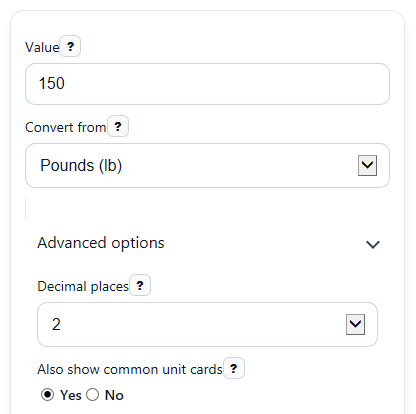
- Enter the number in Value, then choose the starting unit in Convert from.
- Pick your main target in Main result unit to set the first answer card.
- Open Advanced options if you want to change Decimal places, turn Also show common unit cards on or off, or show Show stones and pounds breakdown when possible.
- Click Calculate to see the main conversion, the exact Conversion factor used, and any extra unit cards you turned on.
- Do a quick sanity check: if you convert 16 oz to lb, the Converted value should be 1, and if you convert to the same unit, the number should stay unchanged.
Definitions
Value: The amount you want to convert.
Convert from: The unit your starting number is already in, such as pounds, kilograms, or ounces.
Main result unit: The unit used for the first Converted value card.
Decimal places: How many digits appear after the decimal point in displayed results.
Common unit conversions: Extra cards that show the same amount in other everyday units, so you can compare them at once.
Stones and pounds form: A UK-style body-weight reading written as whole stones plus leftover pounds, where 1 stone = 14 pounds.
Conversion factor used: The fixed unit relationship the calculator applies, such as 1 lb = 0.45359237 kg [3].
Mass vs weight: In everyday life, people often say weight, but this converter uses fixed mass-unit relationships like pounds to kilograms.
Common mistakes and quick fixes
Mistake: Leaving Value blank or typing text instead of a number.
Fix: Enter a real number in Value . Decimals, zero, and negative numbers are allowed.
Mistake: Choosing the wrong starting unit in Convert from , such as entering kilograms but leaving pounds selected.
Fix: Make sure Convert from matches the unit of the number you typed in Value .
Mistake: Reading the first card as pounds when Main result unit is set to kilograms.
Fix: Check Main result unit before using the Converted value .
Mistake: Thinking the Stones and pounds form should always appear.
Fix: Turn on Show stones and pounds breakdown when possible in Advanced options.
Mistake: Expecting the extra comparison cards to show when they were turned off.
Fix: Set Also show common unit cards to Yes if you want the Common unit conversions section.
Mistake: Thinking a rounded answer means the math changed.
Fix: Increase Decimal places if you want more detail. The calculator uses exact internal factors and rounds only for display.
Limitations & Key Assumptions / Boundary Conditions
- This converter uses fixed unit relationships for everyday mass values. It does not model gravity or physics-based force changes.
- Results are rounded only for display, so what you see may differ slightly from the full internal value.
- Very large or very small inputs still convert correctly, but rounded display choices can hide tiny differences.
- The Stones and pounds form is a reading format based on pounds, so it is mainly useful for body-weight style values.
- Negative values are allowed because unit conversion math still works, but they represent amounts below zero rather than a typical body weight.
- If Convert from and Main result unit are the same, the calculator returns the same number because no unit change is needed.
Methodology
How the calculator converts units
The calculator first changes the entered amount into kilograms, then changes kilograms into the target unit. Using one base unit keeps every conversion path consistent.
value_in_kg = input_value * kg_per_from_unit
converted_value = value_in_kg / kg_per_to_unit
Exact factors used
The calculator uses fixed factors for the supported units. Examples include 1 lb = 0.45359237 kg, 1 oz = 0.028349523125 kg, 1 st = 6.35029318 kg, 1 g = 0.001 kg, 1 short ton = 907.18474 kg, and 1 tonne = 1000 kg [3].
Stones plus pounds breakdown
When that option is turned on, the calculator converts the value to total pounds, takes the whole-stone part, then keeps the leftover pounds under 14.
total_lb = value_in_kg / 0.45359237
stones_whole = floor(total_lb / 14)
pounds_remainder = total_lb - 14 * stones_whole
If rounding would make the remainder show as 14.00 lb, the calculator carries that to the next stone so the displayed pounds part stays from 0 up to less than 14.
Mini example
For 150 lb to kg, multiply 150 by 0.45359237. That gives 68.0388555 kg, which displays as 68.04 kg with 2 decimal places.
150 * 0.45359237 = 68.0388555 kg
For 70 kg to pounds, divide 70 by 0.45359237. That gives about 154.3236 lb, which can also be read as 11 st and 0.32 lb after taking out 11 full stones.
Assumptions used by the results
This tool treats the entered number as an everyday mass value, uses exact internal factors, allows zero and negative inputs, and rounds only the displayed output. Real-world measurements can differ if the original number was already rounded before you entered it.
Sources
- NIST Guide to the SI, Appendix B.9: Factors for units listed by kind of quantity or field of science - NIST
- Weight Converter Tools - Convert KG, LBS, Grams, Ounces, Stones, Tonnes, Carats, mg & g - Metriccalc
- Metric Conversion Chart - Definition, Facts, Examples & Quiz - Workybooks
- Metric Weight Conversions - Milligrams, Grams, Kilograms & Metric Tons - Weightconversions