
Use this time card calculator to total clock-in and clock-out entries, subtract unpaid breaks, and see weekly hours, overtime, and optional pay.
Advanced options
How to use our Time Card Calculator
- Choose Time format, Week starts on, Rows to calculate, Break entry method, and Overtime method so the grid matches your timesheet and payroll rule.
- Enter each day's clock in and clock out times. If you did not work a day, leave both time fields blank for that day.
- Enter unpaid break minutes for each day, or use Same unpaid break for each worked day (minutes) in Advanced options if the same lunch break applies to every worked day.
- If you want pay estimates, add Hourly rate (USD) and check Overtime multiplier. Then click Calculate.
- Sanity-check the result by reviewing Daily totals. Make sure each day looks right in both hh:mm and decimal hours, especially overnight shifts or days close to 8 or 40 hours.
Definitions
Time card: A record of when work started and ended each day.
Clock in / clock out: The start time and end time for a work period.
Unpaid break (minutes): Break time that is subtracted from worked time.
Total worked time: All valid daily worked time added together after unpaid breaks are removed.
Total worked time (decimal): The same worked time written as decimal hours for payroll, such as 7.50 hours.
Regular hours: Worked hours that are not counted as overtime under the selected rule.
Overtime hours: Worked hours that count for overtime under the selected rule, such as weekly hours over 40 [1].
Estimated gross pay: Estimated pay before taxes and deductions.
Daily totals: A day-by-day breakdown showing each day's worked time in hh:mm and decimal hours.
Common mistakes and quick fixes
Mistake: Filling in Day 3 clock in but leaving Day 3 clock out blank.
Fix: Enter both times as a pair for that day, or clear both fields if the day was not worked.
Mistake: Typing 24-hour time while Time format is set to 12-hour, or forgetting AM/PM.
Fix: Match the entry style to Time format . Use entries like 9:00 AM in 12-hour mode or 21:00 in 24-hour mode.
Mistake: Entering break time in Day 1 unpaid break (minutes) that is as long as or longer than the shift.
Fix: Check the shift length first, then enter only the unpaid break minutes that should be subtracted.
Mistake: Using Break entry method set to same break each day but still expecting the per-day break fields to control the math.
Fix: When that mode is selected, use Same unpaid break for each worked day (minutes) and ignore the daily break inputs.
Mistake: Expecting Overtime hours to appear when Overtime method is set to no overtime split.
Fix: Change Overtime method to weekly over 40 hours or daily over 8 hours and weekly over 40 hours if you want overtime separated from regular time.
Mistake: Reading Total worked time in hh:mm as if it were the same as Total worked time (decimal) .
Fix: Use hh:mm for a time-style total and decimal hours for payroll math. For example, 38:30 means 38.50 hours, not 38.30.
Limitations & Key Assumptions / Boundary Conditions
- This calculator totals one 5-day or 7-day time card only. It does not combine multiple weeks.
- Overnight shifts are handled by treating a clock-out earlier than clock-in as the next day once. It does not support shifts longer than 24 hours in one row.
- Rounding changes results only when you choose a Time rounding rule. If your employer rounds punches differently, your payroll total may differ.
- The daily-plus-weekly overtime option uses daily overtime over 8 hours and then weekly overtime over 40 hours without double-counting. Some workplaces use different state or union rules.
- Estimated gross pay is shown only when a valid Hourly rate (USD) is entered, and it does not include taxes, tips, bonuses, deductions, or different pay rates.
- Blank days count as 0 only when both the day's clock-in and clock-out fields are blank. A half-filled day is an error and must be fixed.
- Break time must be less than the worked shift for that day. Negative breaks or breaks longer than the shift are not allowed.
Methodology
How the calculator totals time
For each visible day, the calculator reads the entered start time and end time, converts each one to minutes after midnight, and finds the shift length. Then it subtracts the unpaid break for that day.
gross_minutes = end_minutes - start_minutes; if gross_minutes < 0, gross_minutes = gross_minutes + 1440
net_minutes = rounded_gross_minutes - break_minutes
decimal_hours = net_minutes / 60
If the clock-out time is earlier than the clock-in time, the calculator treats that row as an overnight shift crossing midnight. If a break is equal to or greater than the worked shift, the calculator stops and shows an error instead of a negative result.
Weekly total and overtime split
All valid daily net minutes are added to get the weekly total. The calculator shows that total in both hh:mm and decimal hours.
weekly_minutes = sum(net_minutes_day1 ... net_minutes_day7)
When Overtime method is set to weekly overtime only, overtime is any time above 40 hours in the workweek [1].
ot_hours = max(0, total_decimal_hours - 40)
regular_hours = total_decimal_hours - ot_hours
When Overtime method is set to daily over 8 hours and weekly over 40 hours, the calculator first counts each day's hours above 8 as daily overtime. Then it checks whether the remaining regular hours still exceed 40, which prevents double-counting the same hour as overtime twice.
daily_ot_hours = sum(max(0, day_decimal_hours - 8))
remaining_regular = total_decimal_hours - daily_ot_hours
weekly_extra_ot = max(0, remaining_regular - 40)
ot_hours = daily_ot_hours + weekly_extra_ot
regular_hours = total_decimal_hours - ot_hours
Estimated pay
If you enter Hourly rate (USD), the calculator estimates gross pay from regular and overtime hours. If overtime splitting is turned off, all worked hours are paid at the regular rate.
gross_pay = (regular_hours * hourly_rate) + (ot_hours * hourly_rate * ot_multiplier)
Mini example
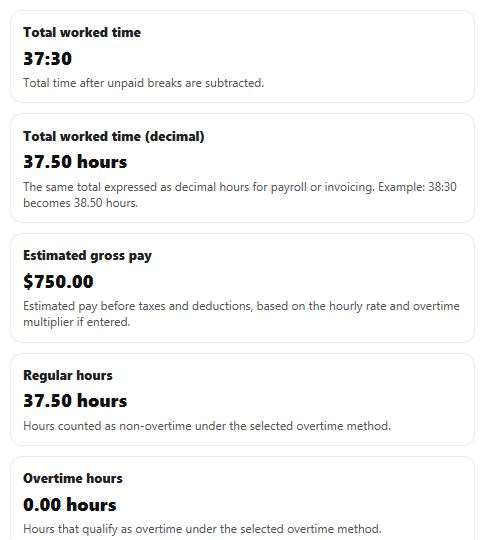
Suppose you work 9:00 AM to 5:00 PM for 5 weekdays and take a 30-minute unpaid break each day. Each day is 8 hours minus 30 minutes, so each day counts as 7 hours 30 minutes, or 7.50 hours. Over 5 days, the weekly total is 37 hours 30 minutes, which is 37.50 decimal hours. Under weekly overtime over 40 hours, that gives 37.50 regular hours and 0 overtime hours. At 20 USD per hour, estimated gross pay is 750 USD.
Assumptions used
The calculator uses one weekly overtime threshold of 40 hours for the weekly method [1]. It also assumes one unpaid break deduction per day row, one start time and one end time per day row, and one rounding rule applied consistently when selected. Real payroll systems can differ because of employer policy, state law, union rules, or punch-rounding rules.
Sources
- Fact Sheet #23: Overtime Pay Requirements of the FLSA | U.S. Department of Labor - DOL
- NYC Comptroller - Weekly Timesheet (PDF) showing daily entries, weekly totals, employee & supervisor signatures - NYC
- Ridgewater College - Telework Daily Time Sheet / Daily Work Log (PDF) referencing supervisor submission and payroll process - Ridgewater