
Use this hours calculator to find worked time between a start and end time, subtract an unpaid break, and avoid overnight shift mistakes.
How to use our Hours Calculator
- Choose Time format, then enter your Start time and End time using the same clock style.
- Select Shift span as Same day if the shift ends before midnight, or Overnight to next day if it crosses midnight.
- Enter Unpaid break (minutes). Use 0 if there was no unpaid break.
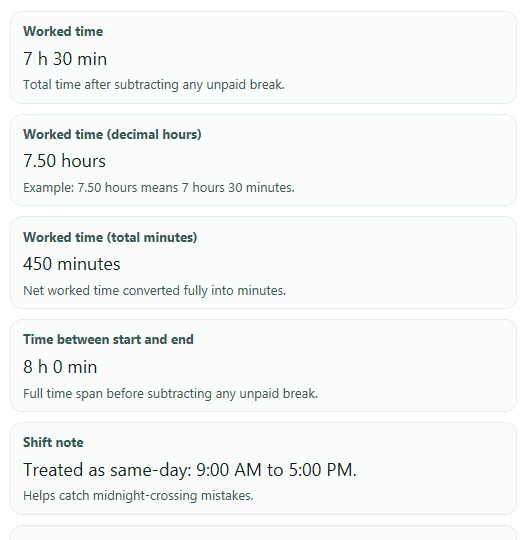
- Click Calculate to see Worked time, Worked time (decimal hours), Time between start and end, Worked time (total minutes), and the Shift note.
- Sanity-check the result by comparing Worked time with Time between start and end; if the numbers do not match your shift, recheck Shift span and Unpaid break (minutes).
Definitions
Start time: When the shift or time period begins.
End time: When the shift or time period ends.
Shift span: Tells the calculator whether End time is later the same day or after midnight on the next day.
Unpaid break (minutes): Minutes removed from the full time span before showing worked time.
Worked time: The net time after subtracting the unpaid break.
Worked time (decimal hours): Worked time written as a decimal number of hours. Example: 7.50 hours means 7 hours 30 minutes.
Time between start and end: The gross time span before any break is subtracted.
Worked time (total minutes): The same net worked time converted fully into minutes.
Shift note: A short message showing whether the result was treated as same-day or overnight.
Common mistakes and quick fixes
Mistake: Entering a night shift but leaving Shift span on Same day , such as 10:00 PM to 6:00 AM.
Fix: Change Shift span to Overnight to next day so the calculator treats End time as the next day.
Mistake: Typing the wrong clock style after choosing Time format .
Fix: Make sure your Start time and End time match the selected Time format before you calculate.
Mistake: Putting a paid meal period into Unpaid break (minutes) .
Fix: Only enter minutes that should be subtracted from pay or worked time. If no time should be removed, enter 0 in Unpaid break (minutes) .
Mistake: Entering an Unpaid break (minutes) value that is longer than the full shift.
Fix: Reduce Unpaid break (minutes) so it is not greater than Time between start and end .
Mistake: Using Worked time (decimal hours) as if it were hours and minutes.
Fix: Read Worked time for hours and minutes, and use Worked time (decimal hours) only for decimal-hour forms or payroll math. For example, 7.50 means 7 hours 30 minutes.
Mistake: Ignoring the Shift note after calculating.
Fix: Check Shift note to confirm the result was treated as same-day or overnight, especially when Start time and End time are close to midnight.
Limitations & Key Assumptions / Boundary Conditions
- This calculator uses simple clock arithmetic, not timezone-aware timestamp math, so it does not adjust for daylight saving time changes.
- Shift span must be chosen correctly. If a shift crosses midnight but Same day is selected, the result will be wrong or trigger an error.
- Unpaid break (minutes) is treated as one total deduction. The calculator does not model multiple breaks or paid versus unpaid segments separately.
- If Start time equals End time and Shift span is Overnight to next day, the tool treats that as a 24-hour span before the break is subtracted.
- The result depends on the clock times you enter. It does not verify schedules, punches, rounding rules, or employer payroll policies.
- Worked time (decimal hours) is rounded for display, so tiny differences can appear compared with systems that store more decimal places.
Methodology
How the calculator works
The tool turns each entered clock time into minutes after midnight, finds the full span between the two times based on Shift span, then subtracts Unpaid break (minutes).
time_minutes = 60 x hour + minute
gross_minutes = end_minutes - start_minutes
gross_minutes = (24 x 60 - start_minutes) + end_minutes
net_minutes = gross_minutes - break_minutes
decimal_hours = net_minutes / 60
When each formula is used
For Same day, the calculator uses the simple difference between End time and Start time. For Overnight to next day, it counts the minutes from the start time to midnight, then adds the minutes from midnight to the end time. The hour-minute and total-minute outputs follow standard time-unit conversion, where 1 hour = 60 minutes [3].
Worked example
Suppose Start time is 9:00 AM, End time is 5:00 PM, Shift span is Same day, and Unpaid break (minutes) is 30.
start_minutes = 60 x 9 + 0 = 540
end_minutes = 60 x 17 + 0 = 1020
gross_minutes = 1020 - 540 = 480
net_minutes = 480 - 30 = 450
decimal_hours = 450 / 60 = 7.50
So the outputs are Worked time = 7 hours 30 minutes, Worked time (decimal hours) = 7.50, Time between start and end = 8 hours 0 minutes, and Worked time (total minutes) = 450.
Error handling
If Shift span is Same day and End time is earlier than Start time, the calculator shows an error telling you to choose overnight if the shift crossed midnight. It also blocks negative break values and blocks any Unpaid break (minutes) value larger than the full span.
Assumptions that affect results
The calculator assumes the entered times are valid clock times, the break is unpaid and should be fully subtracted once, and the shift is either entirely same-day or exactly overnight into the next day. It does not account for daylight saving transitions, time zones, punch rounding, or payroll rules that may change real-world paid hours.