
Use this carbohydrate calculator to estimate a daily carb target in grams from calories and your chosen carb share, then turn it into a simple meal plan.
Advanced options
How to use our Carbohydrate Calculator
- Choose How do you want to calculate? Select I know my daily calories for the fastest result, or Estimate my daily calories first if you want the tool to calculate Daily calories used from Sex, Age (years), Height (cm), Weight (kg), Activity level, and Goal adjustment.
- Pick Carb target method. Use Balanced (50% of calories), Lower carb (40% of calories), Higher carb (55% of calories), or choose Custom percent and enter Carbohydrate share (percent of calories).
- If you want planning help, open Advanced options and enter Meals per day, Snacks per day, and Daily carb split to estimate carbs per meal and carbs per snack.
- Click Calculate. Read Carbohydrate target first, then check Carbohydrate share used, Daily calories used, and General guidance check to understand what drove the answer.
- Do a quick sanity check: if the grams look much higher or lower than expected, confirm you used the right mode, entered realistic Daily calories (kcal/day), and did not mix up a custom carb percent with a preset choice.
Definitions
Carbohydrate target: Your estimated total carbs for one day, shown in grams per day.
Carbohydrate share used: The percent of total calories assigned to carbs in the calculation.
Daily calories used: The calorie number actually used to calculate carbs, either entered directly or estimated from your body data and activity.
General guidance check: A simple note showing whether your chosen carb percent is below, within, or above the common adult range of 45% to 65% of calories [2].
Estimated carbs per meal: Your daily carb target divided across meals, and sometimes snacks, using the selected Daily carb split.
Estimated carbs per snack: The carb amount assigned to each snack when Snacks per day is greater than 0.
130 g/day comparison: A note showing whether your result is below or at least the commonly cited 130 grams of carbohydrate per day reference [2].
Common mistakes and quick fixes
Mistake: Entering Daily calories (kcal/day) while How do you want to calculate? is set to Estimate my daily calories first, then expecting that number to be used.
Fix: In estimate mode, the tool ignores Daily calories (kcal/day) and uses the estimated Daily calories used instead.
Mistake: Choosing Custom percent but leaving Carbohydrate share (percent of calories) blank or entering 0.
Fix: When Carb target method is Custom percent, enter a number greater than 0 and no more than 100 in Carbohydrate share (percent of calories).
Mistake: Typing Height (cm) or Weight (kg) incorrectly in estimate mode, such as using feet, inches, or pounds.
Fix: Enter Height (cm) in centimeters and Weight (kg) in kilograms, because those exact labels are the units used in the calorie estimate.
Mistake: Setting Meals per day to 0 and expecting Estimated carbs per meal to work.
Fix: Enter at least 1 for Meals per day if you want a meal split, or leave the planning fields alone and use only Carbohydrate target.
Mistake: Entering a negative number for Snacks per day.
Fix: Use 0 or a positive whole number in Snacks per day. If you do not snack, leave it at 0 so Estimated carbs per snack shows N/A.
Mistake: Reading General guidance check as a strict rule for every person.
Fix: Use General guidance check as a comparison to common adult guidance, then focus on whether Carbohydrate target and Daily calories used fit your plan.
Limitations & Key Assumptions / Boundary Conditions
- This tool estimates carbs from calories and a chosen carbohydrate percentage. It does not judge food quality, fiber, sugar, or timing around sports or medical needs.
- In Estimate my daily calories first mode, Daily calories used comes from the Mifflin-St Jeor equation plus an activity multiplier and the selected Goal adjustment. Real energy needs can differ.
- General guidance check compares your carb percentage with the common adult 45% to 65% range. A result outside that range is not automatically wrong for every plan.
- The 130 g/day comparison is a general reference point, not a personalized requirement for every person or every eating pattern.
- Meal and snack outputs are planning estimates only. Equal split divides carbs evenly, while Snack-light split assigns 10% of daily carbs to each snack and gives the rest to meals.
- This calculator uses total carbohydrate math only. It does not calculate net carbs or subtract fiber.
- Inputs must stay in the labeled units and valid ranges. For example, estimate mode requires Age (years) from 1 to 120 and positive Height (cm) and Weight (kg).
Methodology
Core calculation
The calculator first finds the daily calories to use. In I know my daily calories mode, it uses your Daily calories (kcal/day). In Estimate my daily calories first mode, it estimates calories from body data, activity, and Goal adjustment.
For male: BMR = 10 x weight_kg + 6.25 x height_cm - 5 x age + 5
For female: BMR = 10 x weight_kg + 6.25 x height_cm - 5 x age - 161
daily_calories_used = BMR x activity_factor + goal_adjust_kcal
The activity factors are 1.2 sedentary, 1.375 light, 1.55 moderate, 1.725 very active, and 1.9 extra active. Goal adjustment adds or subtracts the selected calories from the maintenance estimate.
Converting calories to carbohydrate grams
After calories are set, the calculator converts your chosen carbohydrate share into grams. Carbohydrate provides 4 kcal per gram [1].
carb_percent_decimal = carb_percent / 100
carb_grams_day = (daily_calories_used x carb_percent_decimal) / 4
Preset Carb target method values are 50% for Balanced, 40% for Lower carb, and 55% for Higher carb. If you choose Custom percent, your entered Carbohydrate share (percent of calories) is used instead.
Meal and snack split
If you use the planning options, the calculator turns the daily total into per-meal and per-snack amounts.
Equal split: carb_grams_each = carb_grams_day / (meals_per_day + snacks_per_day)
Snack-light split: carb_grams_snack = carb_grams_day x 0.1
Snack-light split: carb_grams_meal = (carb_grams_day - snacks_per_day x carb_grams_snack) / meals_per_day
In Snack-light split, each snack gets 10% of daily carbs by design. If snacks are set to 0, meals get the daily target divided evenly.
Guidance notes
The tool compares your carbohydrate percentage with the common adult range of 45% to 65% of total calories and notes whether your choice is below, within, or above that range [1]. It also flags when the result is below the commonly cited 130 g/day carbohydrate reference [1]. These notes are comparisons, not hard pass or fail rules.
Mini example
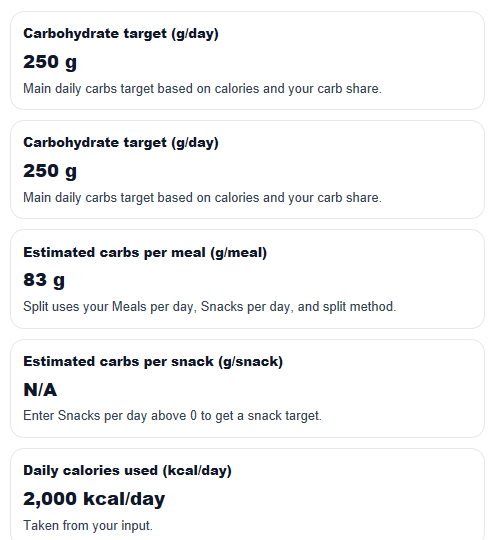
If Daily calories used is 2,000 kcal/day and Carbohydrate share used is 50%, then half of calories come from carbs.
carb_grams_day = (2000 x 0.50) / 4 = 250 g/day
If Meals per day is 3 and Snacks per day is 0 with Equal split, then each meal gets about 83.33 grams, which the main UI rounds to 83 g/meal.
Assumptions used in the math
This method treats carbohydrate percentage as the main driver of your carb target. It does not adjust for medical conditions, athletic fueling strategies, pregnancy, digestion issues, or food label differences. Results are rounded for display, but the internal math uses unrounded values until the end.